TechVerge
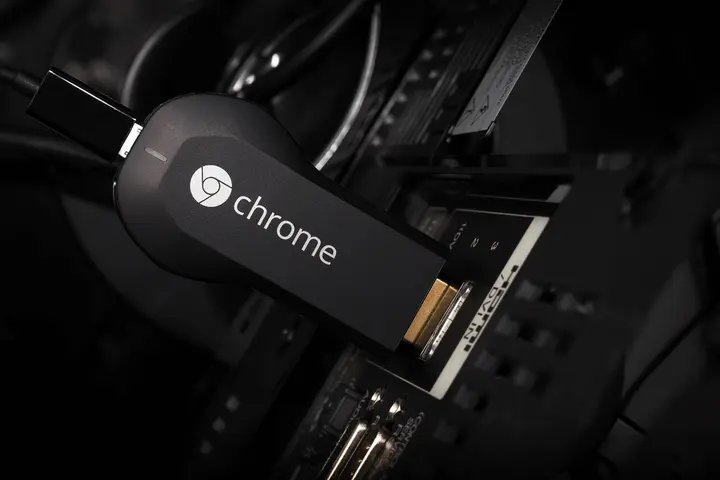
Are you looking for a new Chromecast and can't find one anywhere?
There's a reason for that. Google stopped making Chromecast in 2024, and its replacement is a small box called the Google TV Streamer.
When I first wrote this list in 2021, people looked for Chromecast alternatives because Chromecast had no menu of its own, no 4K and no physical remote.
Now the question is simpler: what do you buy instead? I've rewritten this list with the devices you can actually buy today.
Here, I'll cover the 9 best options, which one fits your setup, and what to do if you already own a Chromecast.
Also Read: 5 Best Free Movie Streaming Sites in 2026 (All Legal)
TL;DR
- Google's own replacement: the Google TV Streamer. You can still cast to it from your phone, just like a Chromecast.
- Cheap with a remote: a Fire TV Stick or a Roku Streaming Stick.
- iPhone users: the Apple TV 4K, which works with AirPlay.
- Already have a smart TV? Check for Google Cast or AirPlay before you buy anything.
- Still own a working Chromecast? Keep using it. Google says it will keep providing software and security updates.
What Happened to Chromecast?
Chromecast was a small dongle that plugged into your TV's HDMI port. You controlled it from your phone: tap the cast button in Netflix, YouTube or Spotify, and it played on the TV.

In August 2024, Google announced the Google TV Streamer and said it replaces Chromecast. Google also ended Chromecast production and sold off the remaining stock.
Will My Old Chromecast Stop Working?
No. Google said it would keep providing software and security updates for the Chromecasts people already have.
So if yours still works, keep using it. This list is for when you need something new.
Also Read: How Does Netflix Work? Streaming and Open Connect Explained
Chromecast Alternatives at a Glance
| If you want… | Try |
|---|---|
| Google's own replacement, with casting | Google TV Streamer |
| A cheap stick with a remote | Fire TV Stick HD or Roku Streaming Stick |
| Hands-free Alexa for your whole TV setup | Fire TV Cube |
| A stick that runs off your TV's USB port | Roku Streaming Stick Plus |
| The best box for iPhone users | Apple TV 4K |
| A box for gamers and Plex | NVIDIA SHIELD TV Pro |
| Pure casting, like the old Chromecast | Xiaomi TV Stick 4K, or the casting built into your TV |
The 9 Best Chromecast Alternatives
1. Google TV Streamer
If you loved your Chromecast, start here. It's Google's official replacement.
Instead of hanging behind the TV, it's a small box that sits in front of it, and it comes with a proper remote.
It runs Google TV, so you get Netflix, YouTube, Prime Video and the rest, with suggestions from all of them on one home screen. The best part is that you can still cast to it from your phone, just like a Chromecast.
It plays 4K HDR with Dolby Vision and Dolby Atmos, and has 32 GB of storage and an Ethernet port. It also works as a smart home hub, with Matter support and a built-in Thread border router.
If you lose the remote down the sofa, there's a "find my remote" feature to help you find it.
- Pros: Casting works like on Chromecast, Ethernet port, Dolby Vision and Atmos, smart home hub.
- Cons: It costs a lot more than the old Chromecast dongles did, and it's a box, not a stick.
- Price: It launched at $99.99 in 2024. The Google Store now lists it at $149.99.
2. Amazon Fire TV Stick 4K
Amazon launched a new Fire TV Stick 4K in 2026. It's faster than the old one and runs Vega OS, Amazon's new operating system.
Older Fire TV sticks ran Fire OS, which is based on Android.
It supports 4K with HDR10, HDR10+ and HLG, plays AV1 video, and has Wi-Fi 6. It also passes Dolby Atmos through to your soundbar.
One caveat: Vega OS only runs apps from Amazon's own app store. You can't sideload apps like you could on the old sticks.
If you want something cheaper, the new Fire TV Stick HD also runs Vega OS and costs $34.99. If you want Dolby Vision, Amazon points gamers and home theater fans to the Fire TV Stick 4K Max.
- Pros: Affordable, fast, Wi-Fi 6, works great with Prime Video and Alexa.
- Cons: Only Amazon's app store, and no Dolby Vision on this model.
- Price: $59.99. The Fire TV Stick HD is $34.99.
3. Amazon Fire TV Cube
The Fire TV Cube was number one on my 2021 list, and Amazon still sells it.
It's the one to get if you want to talk to Alexa across the room without picking up the remote. It can also control your compatible TV, soundbar and receiver with your voice.
It even has an HDMI input, so you can plug a cable box into it. It supports 4K with Dolby Vision, HDR10+ and Dolby Atmos, and has a built-in Ethernet port.
- Pros: Hands-free Alexa, controls your whole TV setup, Ethernet port, Dolby Vision.
- Cons: The current model came out in 2022, and it's bigger and pricier than a stick.
4. Roku Streaming Stick and Streaming Stick Plus
Roku is known for its simple, easy menu. In 2025, Roku released two new sticks: the Roku Streaming Stick and the Roku Streaming Stick Plus.
The best part is that both can be powered by your TV's USB port. You don't need an extra power plug behind the TV.
The Plus model adds 4K with HDR10+.
- Pros: Very easy to use, small, runs off your TV's USB port.
- Cons: The 2025 sticks dropped Dolby Vision.
5. Roku Ultra
If you want the best Roku, it's the Roku Ultra. The current model came out in 2024.
It has Wi-Fi 6, an Ethernet port and Dolby Vision. Its voice remote is rechargeable, and it still has the lost remote finder from the model on my 2021 list.
- Pros: Ethernet for steady 4K streaming, Dolby Vision, lost remote finder.
- Cons: It costs more than the Roku sticks, and you need a spot for the box.
6. Apple TV 4K
If you have an iPhone, this is the one for you.
There's a new Apple TV 4K (4th generation). It has the A19 chip, 128 GB of storage, Wi-Fi 7 and a Gigabit Ethernet port.
It plays 4K with Dolby Vision and HDR10+, and you control it with the Siri Remote.
Just like Chromecast, you can send videos and photos from your iPhone or iPad to it. Apple calls it AirPlay.
- Pros: Fast, very clean interface, works perfectly with iPhone, iPad and Mac.
- Cons: It's the most expensive pick on this list, and it makes the most sense if you're on Apple.
- Price: $299. Pre-orders are open, and Apple says it's available from November 13.
7. NVIDIA SHIELD TV
The SHIELD TV is still the gamer's streaming box. It plays Dolby Vision HDR with Dolby Atmos sound.
Its AI upscaling turns HD video into 4K in real time. You can play games through GeForce NOW cloud gaming, and you can still cast videos to it from Chromecast apps on your phone.
The SHIELD TV Pro adds more storage, two USB 3.0 ports and can run a Plex Media Server.
- Pros: AI upscaling, cloud gaming, Plex server, casting built in.
- Cons: The current models came out in 2019, so the hardware is old for the price.
- Price: NVIDIA lists the SHIELD TV Pro at $299.
8. Xiaomi TV Stick 4K
Want something that feels like a Chromecast with a remote?
The Xiaomi TV Stick 4K has Chromecast built in, so you can cast to it from your phone, laptop or tablet. It runs Android TV 11 with the Google Play Store.
It supports 4K with Dolby Vision and Dolby Atmos, and has 2 GB of RAM and 8 GB of storage.
- Pros: Casting built in, small and portable, comes with a Bluetooth and IR remote.
- Cons: It runs an older Android TV version, and what's available depends on your country.
9. The Casting That's Already in Your TV
Before you buy anything, check your TV. Many smart TVs already have casting built in, so you may not need a Chromecast at all.
- Google Cast: TVs with Google Cast show up as a cast target in apps like YouTube and Netflix, and in Chrome.
- AirPlay: If your TV is an AirPlay-compatible smart TV, you can send videos and mirror your screen from an iPhone or iPad. Open Control Center and tap "Screen Mirroring".
To cast your whole Android screen to a Google streaming device, open the Google Home app, press and hold the device, and tap "Cast". Google says this needs Android 8.0 or newer.
To cast a Chrome tab from your computer, open Chrome, tap the three-dot menu, then "Cast, save, and share" → "Cast…".
No extra device is needed at all.
- Pros: Free, nothing to plug in.
- Cons: Only works if your TV supports it, and smart TV menus are often slower than a good streaming stick.
- Price: Free.
Also Read: 10 Best Discord Alternatives for Gamers and Teams in 2026
What Happened to the Devices on My 2021 List?
Here's what changed since I first published this list:
- Chromecast itself was replaced by the Google TV Streamer in 2024.
- Fire TV Stick 4K and Roku Streaming Stick+ have newer models now (numbers 2 and 4 above).
- Roku Ultra and Apple TV 4K have newer models too (numbers 5 and 6 above).
- Samsung AllShare Cast was an old Samsung dongle that isn't sold anymore.
- Matchstick ran on Firefox OS, which Mozilla stopped developing years ago.
- AnyCast and similar no-name mirroring dongles never get updates, so I dropped them.
Which Chromecast Alternative Should You Choose?
Start with how you already watch, then pick the matching device.
- You loved casting from your phone: Google TV Streamer, or the Xiaomi TV Stick 4K on a budget.
- You live in Amazon's world: Fire TV Stick 4K, or the Fire TV Cube for hands-free Alexa.
- You want the simplest menu: Roku.
- You have an iPhone: Apple TV 4K.
- You game or run Plex: NVIDIA SHIELD TV Pro.
- You just want to watch YouTube on the big screen: check if your TV already has Google Cast or AirPlay.
Final Thoughts
Yes, there's a real Chromecast alternative. If you want the Chromecast experience, the Google TV Streamer is the closest thing, because it's Google's own replacement and you can still cast to it.
If you have an iPhone, go with the Apple TV 4K. If you want something cheap with a remote, a Fire TV or Roku stick will do the job.
The main caveat is Vega OS on the new Fire TV sticks, which only runs apps from Amazon's store. And if your TV already has Google Cast or AirPlay, you might not need to buy anything at all.
FAQs
Will my old Chromecast stop working?
No. Google said it would keep providing software and security updates for the Chromecasts people already have, so keep using yours if it still works.
What replaced Chromecast?
The Google TV Streamer. Google announced it in August 2024 and said it replaces Chromecast.
Can I still cast to the Google TV Streamer from my phone?
Yes. The Google TV Streamer supports casting from your phone, just like a Chromecast.
Which Chromecast alternative is best for iPhone users?
The Apple TV 4K. You can send videos and photos from your iPhone or iPad to it with AirPlay.
Still stuck? Tell me through the contact page.