TechVerge
Want to download a torrent on your iPhone?
Let's face it: torrenting on an iPhone has always been awkward.
That's why I reviewed Seedr in 2024. It downloads the torrent on its own servers, and you just watch or save the file from your browser.
Seedr has since added new plans with much more storage, and its whole website has been redesigned. So I've updated the whole review to match.
The short answer: on an iPhone, Seedr is still the easiest way I know to handle torrents, as long as you only download files you're allowed to.
Also Read: 5 Best Ad-Free Torrent Apps for Android in 2026
TL;DR
- iPhone: Seedr runs in Safari, so you don't need an App Store app. Add it to your Home Screen, paste a torrent link and let Seedr's servers do the download.
- Free plan: 2GB of storage and streaming up to 480p. It's enough to try Seedr.
- Paid plans: more storage and HD streaming. Private trackers need the Pro or Master plan.
- Watch out: Seedr doesn't scan files for viruses, and you can't pick single files from a torrent.
- Legal use only: download only files you have permission to download.
Is Using Seedr Legal?
Seedr itself is a legal service, and torrenting is just a way to share files. Downloading copyrighted movies, music, games or software without permission isn't legal, whether you use Seedr or a normal torrent app.
Seedr's own Acceptable Use Policy bans content that infringes copyright, and says it closes the accounts of users who keep breaking that rule. So stick to files you're allowed to download.
What Is Seedr?
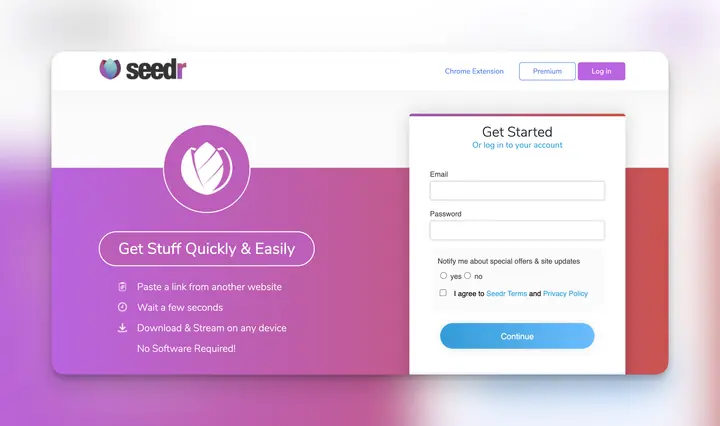
Seedr is a cloud torrent client. Instead of your phone or computer downloading the torrent, Seedr's servers do it for you.
You paste a link, Seedr fetches the files into your Seedr storage, and then you stream them or save them to any device.

The website has changed, too. Seedr hardly uses the word "torrent" anymore, and it talks about "links", "networks" and "fetching files" instead.
But its help page still explains how long Seedr keeps seeding, so torrents are clearly still part of it.
How to Use Seedr on Your iPhone
You don't need an App Store app. Seedr is a web app that runs in Safari, and Seedr says it works on iOS 12 and newer.
Requirements
- An iPhone or iPad with Safari.
- A free Seedr account.
- The link to a torrent you're allowed to download.
Steps
- Open Safari and go to seedr.cc.
- Sign up with your email, then open the activation email Seedr sends you.
- Tap the "Share" button in Safari, then "Add to Home Screen". Now Seedr opens like an app.
- Copy your link and paste it into the box that says "Paste link URL Here".
- Wait for Seedr to fetch it. You can close Safari or lock your phone. The download keeps going on Seedr's servers.
- Tap the file to play it in Seedr's player, or use the save icon to download it.
Seedr also says you can send links to it from other apps through the iPhone's Share menu, once it's on your home screen.
What I Like About Seedr
When I first wrote this review, I'd been using torrent clients for years. I'll be honest: switching to Seedr felt like stepping into the future.
Here's why:
- Your phone doesn't do the downloading. Seedr uses its own servers and bandwidth. Your internet is only used when you stream or save the file.
- Your IP address stays hidden from other people in the torrent. Only Seedr's servers connect to them.
- You can stream right away. Videos play in Seedr's built-in player, with subtitle support and Chromecast and AirPlay casting.
- It works everywhere. Phone, tablet, computer or TV. Seedr also works with Kodi and Roku, and with Plex and Jellyfin through FTP or WebDAV on paid plans.
- No client to set up. No port forwarding, no settings to fiddle with.
What About Seeding?
In 2024, I said you don't need to worry about your ratio. That's only half true.
You don't seed from your own phone. Seedr seeds for you from its servers: on normal torrents, it keeps uploading until it reaches a 1:1 ratio or 12 hours, and the Pro and Master plans seed for longer on private trackers.
Seedr Plans and Prices
Seedr's plans have changed a lot since my 2024 review. Back then, I saw Basic with 30GB, Pro with 100GB and Master with 1TB, and the prices were shown to me in rupees.
Here's what Seedr's website lists in November 2026, in US dollars. You may see prices in your local currency.
| Plan | Storage | Streaming | Price |
|---|---|---|---|
| Free | 2GB | Up to 480p | Free |
| Lite | 10GB | HD | $3.95/month |
| Basic | 50GB | 740p | $7.95/month |
| Pro | 500GB | 1080p | $12.95/month |
| Master | 2TB | 4K | About $20/month |
Paying yearly saves you a bit on Basic, Pro and Master. There are also "Gold" plans if you need more than 1TB with extra speed.
A few things to know:
- Private trackers (Seedr calls them "private networks") need the Pro or Master plan.
- FTP access starts with Basic. WebDAV, which lets you mount Seedr as a drive or connect Plex and Jellyfin, is for Master.
- Files stay in your storage until you delete them, on free and paid plans.
Is It Worth Paying For?
If you only grab a small file now and then, the free plan is enough to try it. If you want HD streaming or big files, you'll need a paid plan.
The Catches to Watch Out For
Here are the catches.
- 2GB fills up fast. One HD movie can be bigger than the whole free plan.
- Free streaming is only up to 480p.
- Seedr doesn't scan files for viruses. Its help page says this isn't available yet. Be careful with programs, APKs and EXE files from torrents.
- You can't pick single files. Seedr downloads the whole torrent, so a big pack eats your storage.
- Rare torrents may fail. Seedr marks them in yellow or red, which means they may be slow or impossible to finish.
- You're trusting Seedr. Your internet provider can see that you use Seedr, but not what you download. Seedr's servers, of course, do the downloading for you.
Also Read: How to Create Your Own VPN: The Definitive Guide
Seedr vs a Normal Torrent App
On Android, you can use a proper torrent app, and I've linked my list of the best ones at the top of this review.
So why use Seedr?
- It's the easiest option on an iPhone.
- Nothing downloads to your phone unless you want it.
- You can start a download on your laptop and watch it on your phone later.
Also Read: How to Create Your Own Torrent Files (qBittorrent and uTorrent)
A normal torrent app is better if you want to choose single files, keep seeding yourself, or avoid paying for storage.
Final Thoughts
I said in 2024 that Seedr is a solid choice for most torrent users, and I still think so. It's simple, it hides your IP address from the swarm, and it's the easiest way I know to handle torrents on an iPhone.
Start with the free plan. If you find yourself deleting files every day to make room, that's when a paid plan makes sense.
And please, use it only for files you're allowed to download.
FAQs
Is Seedr legal to use on iPhone?
Seedr itself is a legal service, but downloading copyrighted movies, music, games or software without permission isn't legal. Stick to files you're allowed to download.
Do I need an app to use Seedr on iPhone?
Seedr is a web app that runs in Safari, so no App Store download is needed. Seedr says it works on iOS 12 and newer.
Is the free Seedr plan enough?
The free plan gives you 2GB of storage and streaming up to 480p. It's enough to try Seedr, but HD streaming and big files need a paid plan.
Does Seedr scan files for viruses?
No. Seedr's help page says virus scanning isn't available yet, so be careful with programs, APKs and EXE files from torrents.
Can I download only some files from a torrent with Seedr?
Seedr can't pick single files, because it downloads the whole torrent and a big pack eats your storage. A normal torrent app is better if you want to choose only some files.
Still stuck? Tell me through the contact page.