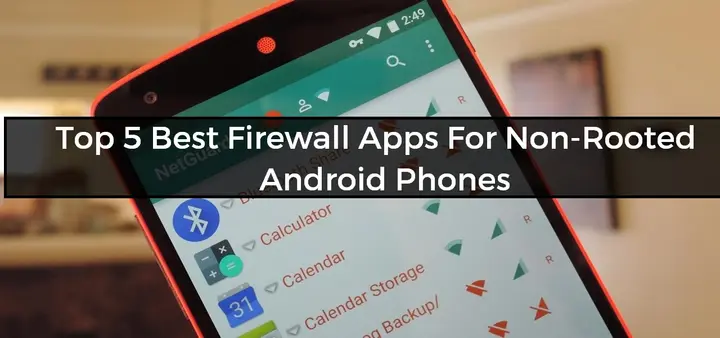
Do you know which apps on your phone are using the internet right now?
Most of us don't. Some apps talk to ad networks and trackers all day, even when you're not using them.
A firewall app lets you decide which apps are allowed online.
You might be wondering whether it needs root. It doesn't, and every app on this list works without root.
I first wrote this list in 2016. Since then, four of the five apps on it have disappeared from the Play Store, so I've rewritten it.
Also Read: What to Do After Rooting Android: 10 Useful Things
TL;DR
- My pick: NetGuard, a simple, free, open-source firewall that blocks apps on Wi-Fi or mobile data.
- Firewall and VPN together: Rethink combines a firewall, encrypted DNS and a WireGuard VPN in one app.
- Trackers: TrackerControl shows which trackers each app uses and lets you block them one by one.
- No root needed: all five apps work without root. Built-in Android controls can limit background data, but they aren't a full firewall.
- Stay safe: install firewall apps only from Google Play, F-Droid or the developer's official page.
What Is a Firewall App on Android?
A firewall app on Android blocks chosen apps from the internet, on Wi-Fi, mobile data or both.
Firewall apps also do more:
- They stop apps from using data in the background.
- Some can block ads and trackers in every app.
- Some show every connection an app makes, so you can see who it's talking to.
What a Firewall App Can't Do
In 2016, I wrote that a firewall stops hackers from watching your bank transfers. That was too much.
A firewall app doesn't make your phone hacker-proof.
It isn't an antivirus, either. If you install a bad app and give it permissions, a firewall won't clean it up.
How Do Firewall Apps Work Without Root?
Android lets one app at a time act as a VPN. A no-root firewall uses that slot.
It creates a small VPN that runs on your phone, checks the traffic of every app, and blocks what you told it to block.
The firewall part runs on your phone. Your traffic isn't routed through someone else's server unless you choose to connect a VPN.
The catch: only one VPN can run at a time, so you can't use a firewall like this and a normal VPN app together. Rethink and TrackerControl get around this by connecting to a WireGuard VPN themselves.
Firewall Apps at a Glance
| App | Best for | Price |
|---|---|---|
| NetGuard | A simple per-app firewall | Free; Pro features are paid |
| Rethink | A firewall, private DNS and VPN in one app | Free |
| TrackerControl | Seeing and blocking trackers in your apps | Free |
| InviZible Pro | A firewall with Tor | Free on F-Droid |
| PCAPdroid | Inspecting every connection in detail | Free app; the firewall is paid |
The 5 Best Firewall Apps for Non-Rooted Android Phones
1. NetGuard
NetGuard was on my 2016 list, and it's still my number one. Its developer called it the first free and open-source no-root firewall for Android.
You get a list of your apps, with two switches each: one for Wi-Fi and one for mobile data. Tap to block.
It also has handy options, like blocking apps only when you're roaming, or allowing an app only while your screen is on.
It supports IPv4 and IPv6. Missing IPv6 was NoRoot Firewall's big weakness back then.

Pros:
- Very simple to use.
- Free, open source, with no tracking or analytics.
- Available on Google Play, F-Droid and GitHub.
Cons:
- Traffic logs and per-address rules are paid Pro features.
- The Play Store version can't do hosts-file ad blocking. The GitHub version can.
- It doesn't support work profiles, Samsung's Secure Folder or cloned "dual" apps, and Wi-Fi calling can fail on some carriers.
Price: Free; Pro features are a paid upgrade.
2. Rethink: DNS + Firewall + VPN
Rethink does three jobs in one app. It's a firewall that can block apps on Wi-Fi or mobile data, with rules like "block when the screen is off" or "block on metered connections."
It also encrypts your DNS, which can block ads and trackers. It can send your traffic through any WireGuard VPN you choose, so you don't lose your VPN by using a firewall.
Pros:
- Firewall, encrypted DNS and VPN in one place.
- Shows every connection each app makes.
- Free and open source, on Google Play and F-Droid.
Cons:
- So many settings that it can feel like too much at first.
- Blocking apps in the background uses Android's Accessibility access.
Price: Free.
3. TrackerControl
Want to know which companies your apps are sending data to? TrackerControl shows you the trackers inside each app, tells you who's behind them, and lets you block them one by one.
It's run as a research project, and its network engine is based on NetGuard. You can also route your traffic through Mullvad, IVPN or your own WireGuard setup.
Pros:
- The clearest view of tracking in your apps.
- Lets you block trackers without blocking the whole app.
- Free and open source.
Cons:
- The Google Play version is a "Slim" build with fewer blocking options. The full version is on F-Droid and GitHub.
- Blocking trackers can break some features in some apps.
Price: Free.
4. InviZible Pro
InviZible Pro is for people who want more privacy, not just a firewall. It combines Tor, DNSCrypt for encrypted DNS and I2P, with a firewall that lets you allow or block the internet for each app.
It works with or without root.
Pros:
- Firewall and Tor in one app.
- Open source, on Google Play and F-Droid.
Cons:
- More complicated than NetGuard.
- The Google Play version is missing some of the DNSCrypt filtering for ads and malware.
Price: Free on F-Droid.
5. PCAPdroid
PCAPdroid is a network monitor first. It shows every connection your apps make and where in the world each server is.
You can save the traffic to check it on a computer. Everything is processed on your phone.
The firewall, which lets you block apps, domains and IP addresses, is one of its paid features.
Pros:
- The most detailed view of your phone's traffic.
- Open source, on Google Play and F-Droid.
Cons:
- Made for curious and technical users.
- The firewall isn't free.
Price: Free app; the firewall is a paid feature.
Also Read: 5 Best Ad-Free Torrent Apps for Android in 2026
Can You Block Apps Without an App?
Yes, partly. Android has built-in data controls, but they aren't a full firewall.
- Data Saver stops most apps from using mobile data in the background. You can still pick apps that are always allowed.
- Per-app background data: open "Settings" → "Apps", pick an app, and look for its mobile data settings. Turn off background data to stop it using data when you're not using it. The exact names differ by phone.
- Samsung phones have "Allowed networks for apps" under "Settings" → "Connections" → "Data usage". You can set an app to Wi-Fi only, mobile data only, or both, but you can't block both.
If you want an app completely offline, use one of the apps above.
Tips for Keeping Your Firewall Running
- In your phone's VPN settings, turn on "Always-on VPN" for your firewall app, so it starts again after a reboot.
- Allow it to run in the background in its battery settings, or your phone may close it.
- Block apps one at a time and test them. If something stops working, you'll know why.
- Only install firewall apps from Google Play, F-Droid or the developer's official page. NetGuard's developer warns that a fake app on the Samsung Galaxy Store uses NetGuard's package name.
What If My Phone Is Rooted?
With root, you can use AFWall+, a firewall built on Linux's iptables. It doesn't need the VPN slot, so you can keep a normal VPN running too.
Which Firewall App Should You Use?
- Just want to block apps: NetGuard.
- Want a firewall and a VPN in one app: Rethink.
- Mostly care about trackers: TrackerControl.
- Want to see every connection your phone makes: PCAPdroid.
- Want Tor as well: InviZible Pro.
What Happened to the Apps From My 2016 List?
When I first published this list, it had NoRoot Firewall, NetGuard, Mobiwol, NoRoot Data Firewall and LostNet NoRoot Firewall.
Today, only NetGuard is still on Google Play. The other four are gone from the store, so I've replaced them.
Also Read: How to Create Your Own VPN: The Definitive Guide
Final Thoughts
My pick is NetGuard if you just want to block apps. Choose Rethink if you want a firewall and a VPN in the same app, and TrackerControl if you mostly care about trackers.
The main caveat is the VPN slot. A firewall that runs as a VPN can't sit alongside a normal VPN app, unless it connects to WireGuard itself.
Which apps stay on the stores is hard to predict. Four of the five apps on my 2016 list are gone, so check the store page before you install.
FAQs
What is the best firewall app for Android without root?
NetGuard is my top pick for simple per-app blocking. It's free, open source and works without root.
Does a firewall app on Android need root?
No, every app in this list works without root, and only the rooted option, AFWall+, needs it.
Can a firewall app and a VPN run at the same time?
Usually not, because Android allows only one VPN at a time. Rethink and TrackerControl get around this by connecting to a WireGuard VPN themselves.
Can I block apps without installing a firewall app?
Partly. Data Saver and per-app background data settings can stop apps from using data in the background, but they aren't a full firewall.
Is a firewall app the same as an antivirus?
No. A firewall blocks chosen apps from the internet, but it won't remove a bad app that you've already installed and given permissions.
Still stuck? Tell me through the contact page.

Topics
Comments (7)
Comments are closed. Have a question about this article? Ask through the contact page.



Awesome helpful website as always..!
Thank you...
nice post xaif very impressive
Thank you ;)
Superb one again Xaif ;) just loved this article v much :)
Thank you...
Very useful article. Loved the way it's written. Liked your way. We can collaborate in future, if interested send me a mail ????