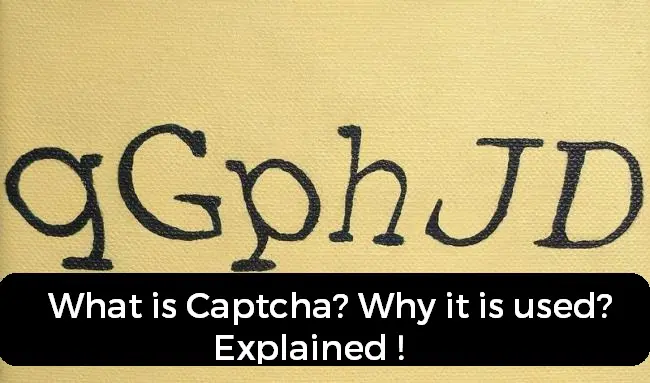
Ever been asked to prove you're human before a form would submit?
Type these squiggly letters, click every traffic light or tick "I'm not a robot".
That's a CAPTCHA.

When I first wrote this in 2017, most CAPTCHAs looked like the one above. Many are now invisible, and your iPhone can pass some of them for you.
AI has also become very good at solving the old puzzles.
In this article, I'll explain what CAPTCHA is, why websites use it and what the main types look like today.
Also Read: Why Aren't Keyboard Letters in Alphabetical Order?
TL;DR
- What it is: a quick test that's easy for people and hard for bots. Websites use it to keep automated programs out of forms, sign-ups and logins.
- Old CAPTCHAs: squiggly letters are on their way out, because computers read them well.
- Today: reCAPTCHA v2 (the checkbox), reCAPTCHA v3 (a silent score), Cloudflare Turnstile and Apple's Automatic Verification, which is on by default on iPhone, iPad and Mac.
- The catch: a 2024 research paper solved every reCAPTCHA v2 picture puzzle with freely available image AI, so newer systems look at much more than the puzzle.
CAPTCHA at a Glance
Here's how the main types compare.
| CAPTCHA type | How it works | How much you have to do |
|---|---|---|
| Text CAPTCHA | Squiggly letters you type | Type them |
| reCAPTCHA v2 | "I'm not a robot" checkbox, with a picture puzzle when Google isn't sure | Tick a box, sometimes solve a puzzle |
| reCAPTCHA v2 invisible | Runs when you click a button, and only suspicious visitors get a puzzle | Usually nothing |
| reCAPTCHA v3 | Gives each visit a score from 0.0 to 1.0 | Nothing |
| Cloudflare Turnstile | Small, invisible checks in your browser | Usually nothing |
| Apple Automatic Verification | Checks your device and Apple Account, then passes a token to the site | Nothing |
What Is CAPTCHA?
CAPTCHA stands for Completely Automated Public Turing test to tell Computers and Humans Apart.
That's a mouthful. The simple version: it's a quick test that's easy for people and hard for bots.
A bot is a program that visits websites on its own, without a human. Some bots are good, like the ones Google uses to find web pages.
Others create fake accounts, post spam or try to break into accounts.
The term CAPTCHA was coined in 2003 by Luis von Ahn, Manuel Blum, Nicholas Hopper and John Langford.
What Is the Turing Test?
The Turing test is named after the computer scientist Alan Turing.
Imagine chatting by text with two people, one human and one computer. If you can't tell which is the computer, the computer passes the test.
A CAPTCHA flips this around. Here, a computer is the judge, deciding whether you're a human.
That's the "Completely Automated" part of the name.
Why Do Websites Use CAPTCHA?
Websites use CAPTCHA to stop bots from doing things only real people should do, such as:
- Creating thousands of fake accounts
- Posting spam comments and fake reviews
- Guessing passwords over and over
- Buying up concert tickets or limited products in seconds
- Copying a whole website's content
In 2017, I wrote that CAPTCHA mainly protects a website from DoS attacks that eat up its server's memory.
To be clear, that's only a small part of the story. A CAPTCHA can slow down some bot traffic, but large attacks are usually stopped by the hosting company or a protection service before they reach the site.
Its main job is to keep bots out of forms, sign-ups and logins.
Types of CAPTCHA, Old and New
1. Text CAPTCHA
The squiggly letters. Computers got good at reading them years ago, so you'll see them less and less.
2. reCAPTCHA v2: "I'm Not a Robot"
Google bought reCAPTCHA in 2009. Its checkbox is probably the CAPTCHA you know best.
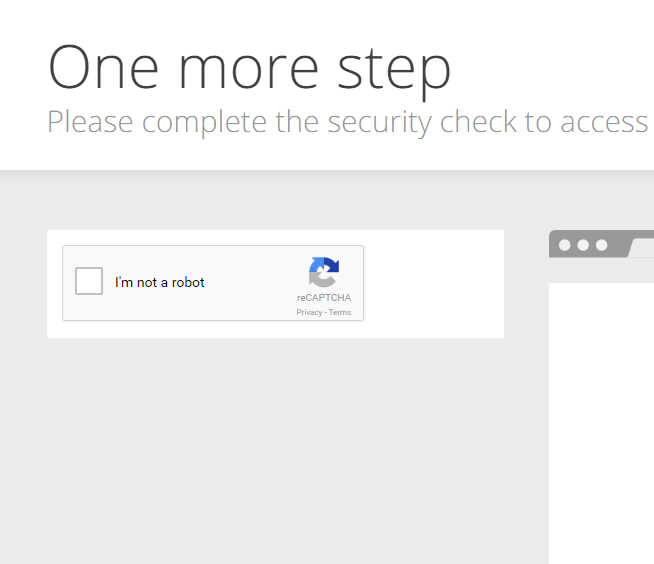
You tick the box. If Google is fairly sure you're human, you're through.
If not, you get a picture puzzle.
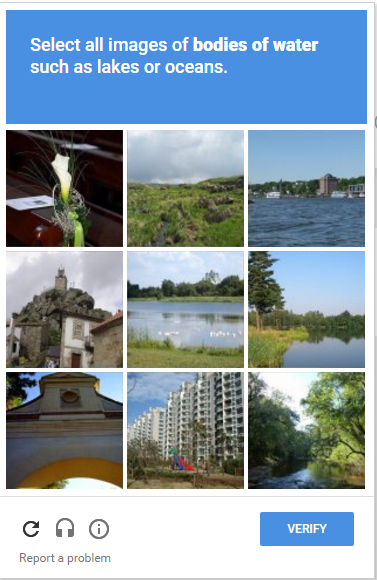
There's also an invisible version of v2 with no checkbox at all. It runs when you click a button, and only the most suspicious visitors get a puzzle.
The very first version, reCAPTCHA v1, was shut down in March 2018.
3. reCAPTCHA v3: No Clicking at All
With reCAPTCHA v3, you don't have to do anything.
It watches how the visit looks and gives it a score from 0.0 to 1.0. A score of 1.0 means "very likely a good interaction", and 0.0 means "very likely a bot".
The website then decides what to do. A low score might mean an extra check, like a code sent to your email.
4. Cloudflare Turnstile
In September 2022, Cloudflare launched Turnstile, a free CAPTCHA alternative.
Instead of puzzles, it runs a set of small, invisible checks in your browser in the background. Sometimes you'll see a simple checkbox, but usually you won't need to do anything.
Websites can use it even if they don't use Cloudflare for anything else, and it has a free plan.
5. Automatic Verification on iPhone, iPad and Mac
Your Apple device can pass some CAPTCHAs for you.
Apple calls it Automatic Verification. It's built on something called Private Access Tokens, and it arrived with iOS 16 and macOS Ventura in 2022.
Here's how it works. Apple checks that your device and Apple Account are genuine.
Then a separate company issues a token that tells the website "this is a real person on a real device".
The website never learns who you are. Apple says it never learns which app or website you're signing in to.
It's turned on by default. To check it, go to "Settings" → "[your name]" → "Sign-In & Security" → "Automatic Verification".
Cloudflare's Turnstile is one of the services that uses these tokens.
Can AI and Bots Solve CAPTCHAs Now?
Yes, and this is the biggest change since 2017.
In 2017, I quoted a claim that humans solve CAPTCHAs 80% of the time but bots only 0.01% of the time. I couldn't find a source for that today, and it certainly isn't true anymore.
In September 2024, researchers at ETH Zurich published a paper called "Breaking reCAPTCHAv2". Using freely available image AI, they solved 100% of reCAPTCHA v2's picture puzzles.
They also found no big difference between humans and bots in how many puzzles they had to solve to get through.
And it isn't only AI. Some services pay real people tiny amounts to solve CAPTCHAs for bots all day.
That's why modern systems care less about the puzzle and more about everything around it: your browser, your cookies, how you move and whether your device is genuine. The same paper found that reCAPTCHA v2 relies heavily on cookies and browsing history.
Why Do I Keep Getting CAPTCHAs?
If you see them all the time, it's usually because the website can't tell much about you. Common reasons:
- You're using a VPN, or a network many other people share.
- You browse in private mode or clear your cookies often.
- A browser extension blocks the scripts these checks need.
- You're signed out of everything.
- Your device's software is out of date.
How to Avoid CAPTCHA
You can't avoid CAPTCHA completely. In 2017, I wrote that you just have to fill it in, and that's still mostly true.
You'll see far fewer, though, if you:
- Stay signed in to websites you use often.
- Allow cookies for those sites.
- Leave Automatic Verification on, if you use an iPhone, iPad or Mac.
- Turn off your VPN for that one site, if it keeps blocking you.
- Keep your browser and device updated.
If you can't see or hear well, look for the audio or accessibility option most CAPTCHAs have.
One thing I won't recommend: "CAPTCHA bypass" extensions or paid solving services. They exist to help bots get past these checks, and you'd be handing your browsing to a stranger.
Also Read: How to Unblock Blocked Websites on Android (3 Safe Ways)
My Experience With Hacker Attacks and CAPTCHA
Some time before I first wrote this, my site was hit by DoS attacks.
I tried everything to fix it, but I couldn't. In the end, I changed my hosting, and that solved it.
If it happened today, I'd put the site behind a protection service that filters bad traffic before it reaches the server, and add a CAPTCHA or Turnstile to the forms.
Also Read: What Is the Surface, Deep and Dark Web?
Final Thoughts
CAPTCHA is a simple idea: a test that's easy for you and hard for a bot.
But bots and AI got smarter, so CAPTCHAs had to change. The best ones barely ask you to do anything at all.
My advice: if you run a website, put a protection service in front of it and add Turnstile or a similar check to your forms. As a visitor, stay signed in and keep your browser updated.
FAQs
What is a CAPTCHA?
A CAPTCHA is a test that's easy for people and hard for bots. Websites use it to keep automated programs out of forms, sign-ups and logins.
Why do I keep getting CAPTCHAs?
Usually because the website can't tell much about you. Using a VPN, browsing in private mode, clearing your cookies often and being signed out are common reasons.
Can AI solve CAPTCHAs?
Yes. In 2024, researchers at ETH Zurich used freely available image AI to solve 100% of reCAPTCHA v2's picture puzzles.
Can I avoid CAPTCHA completely?
Not completely, but you'll see far fewer if you stay signed in to sites you use often and keep Automatic Verification on for an iPhone, iPad or Mac. Avoid "CAPTCHA bypass" extensions, because they help bots get past these checks.
What is Cloudflare Turnstile?
Cloudflare Turnstile is a free CAPTCHA alternative that runs small, invisible checks in your browser. Sometimes it shows a simple checkbox, but usually you don't need to do anything.
Still stuck? Tell me through the contact page.

Topics
Comments (2)
Comments are closed. Have a question about this article? Ask through the contact page.


Hey xaif,also visit this site for more tricks
I will surely visit it