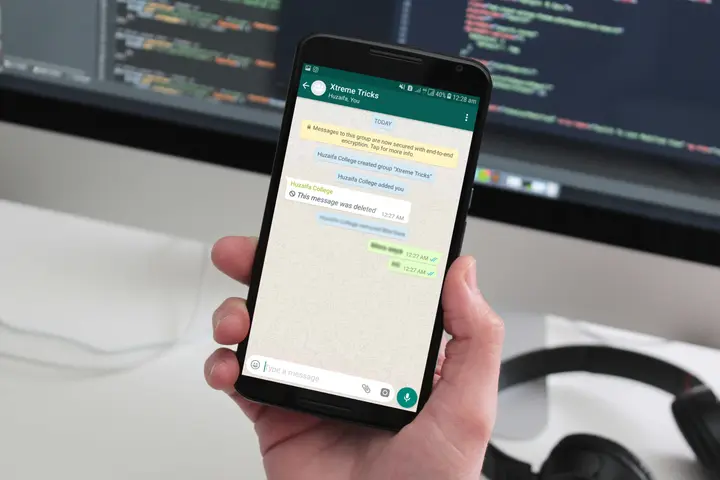
Have you ever sent a message to the wrong chat? Or sent something to the family group that was meant for your friends?
It happens to everyone.
The quick answer: tap and hold the message, tap the trash can, then tap "Delete for everyone" within two days of sending it. For a small typo, edit the message within 15 minutes instead.
Here, I'll show you how to use it, how long you have, what your friend sees, and a better option for small mistakes.
Also Read: How to Read Deleted WhatsApp Messages on Android Without Root
TL;DR
- Time limit: you have two days after sending to delete a message for everyone. After that, you can only delete it for yourself.
- How to delete: tap and hold the message, tap the trash can, then tap "Delete for everyone". The steps are similar on Android and iPhone.
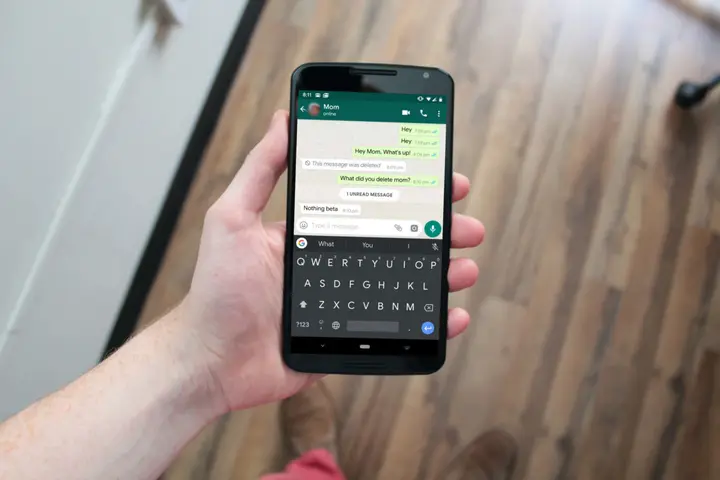
- What they see: the message is replaced with "This message was deleted", so they know something was removed, but not what it was.
- For small mistakes: edit the text within 15 minutes instead. You can't edit photos, videos or other media.
- Not a magic undo: they may have already read it, and WhatsApp won't tell you if the deletion fails.
What Is Delete for Everyone on WhatsApp?
Delete for Everyone removes a message you sent from the chat for everyone in it. It's different from "Delete for me", which only removes the message from your own phone.
When I wrote this article in September 2017, WhatsApp was secretly testing a way to "revoke" sent messages. To use it before everyone else, you needed a beta version, a rooted phone and an app called WA Tweaks.
Not anymore. The feature is now called Delete for Everyone, and it's built into WhatsApp on every Android phone and iPhone.
Delete for Everyone vs. Edit at a Glance
| Option | Time limit | What your friend sees | Best for |
|---|---|---|---|
| Delete for Everyone | Two days after sending | "This message was deleted" | A message you shouldn't have sent |
| Edit | 15 minutes after sending | The new text, marked "edited" | Fixing a typo in a text message |
| Delete for me | Works after the two days too | Nothing changes for them | Removing it from your own phone only |
If you only need to fix a word, edit it. If the whole message is wrong, delete it for everyone.
How Long Do You Have to Delete a WhatsApp Message?
When the feature first launched, you only had about seven minutes.
Now WhatsApp gives you two days after you send a message to delete it for everyone. After that, you can only delete it for yourself.
How to Delete a WhatsApp Message for Everyone on Android
- Open the chat with the message you want to delete.
- Tap and hold the message. You can tap more messages to delete several at once.
- Tap the trash can icon at the top.

- Tap "Delete for everyone".

That's all it takes.
How to Delete a WhatsApp Message for Everyone on iPhone
- Open the chat with the message.
- Tap and hold the message, then tap "Delete". If you don't see it, tap "More" first, then "Delete".
- Tap the trash can icon.
- Tap "Delete for everyone".
What Does Your Friend See?
The message is replaced with "This message was deleted".

So yes, they'll know you deleted something. They just won't know what it was.
If a group admin deletes someone else's message, it says "This message was deleted by admin" with the admin's name.
Things to Know Before You Rely on It
Delete for Everyone is not a magic undo button.
- They might have seen it already. If your friend read it, or saw it in a notification, deleting it won't make them forget.
- It doesn't always work. WhatsApp says you won't be told if the deletion fails.
- Everyone needs an up-to-date WhatsApp. Both you and the people you sent it to should be on the latest version.
- Photos can stay on iPhones. If your friend uses an iPhone and saves media to Photos, your photo or video might still be in their gallery.
- Group admins can delete your messages too. Admins can delete any member's message for everyone within two days, and the group sees which admin did it.
When you pick "Delete for me" by mistake, WhatsApp shows an "Undo" option for a few seconds. Tap it fast.
Also Read: How to Use the Recycle Bin on Your Android (No App Needed)
Made a Typo? Edit the Message Instead
What if you only made a small mistake? Then edit it instead of deleting it.
You can edit a text message for up to 15 minutes after you send it.
How to Edit a WhatsApp Message on Android
- Tap and hold the message.
- Tap the pencil icon.
- Change your message and tap the checkmark.
How to Edit a WhatsApp Message on iPhone
- Tap and hold the message.
- Tap "Edit".
- Change your message and tap the blue checkmark.
Your friend sees the new text with the word "edited" next to the time.
The best part is that editing doesn't send them a new notification. But you can't edit photos, videos or other media.
Also Read: How to Convert WhatsApp Voice Messages to Text on Android & iPhone
Final Thoughts
In 2017, you needed root and a beta app to try this. Now it's a few taps away on every phone, and you have two days to change your mind.
For small mistakes, edit the message within 15 minutes. For anything else, Delete for Everyone works within two days, but remember that it can't make someone forget a message they already read or saw in a notification.
WhatsApp has changed this time limit before, going from about seven minutes to two days. Check the in-app options if the steps look different on your phone.
FAQs
How long do you have to delete a WhatsApp message for everyone?
You have two days after you send a message to delete it for everyone. After that, you can only delete it for yourself.
Can I edit a WhatsApp message after sending it?
Yes, for up to 15 minutes after you send a text message. You can't edit photos, videos or other media.
Does the other person know I deleted a WhatsApp message?
Yes. The message is replaced with "This message was deleted", so they know something was removed but not what it was.
Can a group admin delete my WhatsApp message?
Yes. Admins can delete any member's message for everyone within two days, and the group sees which admin did it.
Still stuck? Tell me through the contact page.

Topics
Comments (9)
Comments are closed. Have a question about this article? Ask through the contact page.

The application can't be installed. Why? I tried removing my WhatsApp but it didn't install.
Hey, sorry for the issue. Please try the official link to download the app
https://whatsapp.com/android
If you still get the error simply enroll for beta version wait for 15 mins and then update the application on your phone with the help of play store.
Best Regards
Xaif
I am also facing the same problem. phone couldn't install your apk so I installed that on android emulator. But it also not showing the delete for everyone feature. Any solutions?
Enroll to the beta version and then try updating application with the help of play store.
And Whatsapp haven't even listed this feature on Playstore. And no other website has info about launching of this feature, except yours. But that's not working.
I showed the screenshot of working and I have seen many Android phones and on their phone it is working fine.
Working fine and thanks for nifty trick
Difference between message recall & message deleted?
The message has been recalled means that the user has deleted the message and user don't want to show the message to the receiver. Then the receiver will get the message this message has been deleted by the user and in laptop, you will get message that it is been revoked