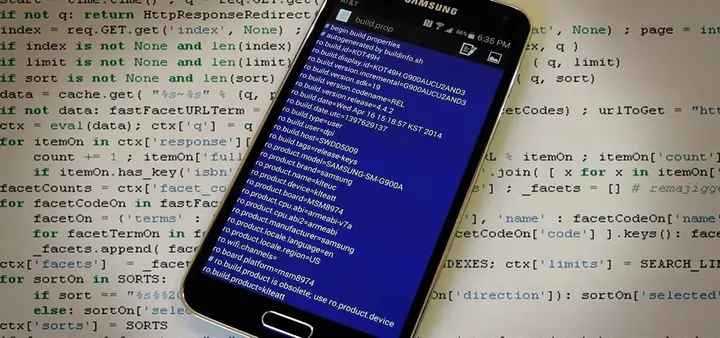
Hey, Fellas! Today I am going to tell you about Build Prop Tweaks.
As you know, Android is open source, and Android development has grown a lot these days. The Android operating system keeps some really important information in a file called build prop.
Whenever a user wants to edit the Android system, they make changes in build prop. Build prop tweaks help you change the system and customize your Android.
Because Android is open source, users and developers check the system codes to find which ones suit every Android smartphone best. So today I am sharing the Build Prop Tweaks for your Android device.
These tweaks work on every Android device. They work fine on Android versions such as Jelly Bean, KitKat, Lollipop and Marshmallow.

If you have a rooted Android device, these tweaks will work fine. Every user can edit build prop.
But while editing, make sure you do it properly, or you can brick your Android device. Then you would have to Install custom ROM on your Android device.
You can easily reduce the boot-up time of your Android, increase the sound and much more.
Let me give you an example.
Suppose your Android device has no navigation bar. Now you accidentally drop your device, and your buttons stop working. With the help of build prop, you can easily add a navigation bar to your screen.
Make sure you don't brick your Android device while making any changes. You have to play safe if you play with build prop.
I am sharing these build prop tweaks for users who are not able to use apps such as Dolby Atmos, Viper4android and other apps.
After you add this code to your Android device, you have to restart it to make the device run the code.
This is really simple and easy. If you follow this guide properly, you will be able to run those codes. So let's get started.
Best Build Prop Tweaks Codes
Below are the Build Prop Tweaks which will help you get the best functions on your device, such as a faster boot speed, a faster internet speed and much more.
1. Better RAM management
ro.HOME_APP_ADJ=1
2. Improves audio and video recording quality
ro.media.enc.jpeg.quality=100
ro.media.dec.jpeg.memcap=8000000
ro.media.enc.hprof.vid.bps=8000000
ro.media.capture.maxres=8m
ro.media.panorama.defres=3264×1840
ro.media.panorama.frameres=1280×720
ro.camcorder.videoModes=true
ro.media.enc.hprof.vid.fps=65
3. Faster streaming videos
media.stagefright.enable-player=true
media.stagefright.enable-meta=true
media.stagefright.enable-scan=true
media.stagefright.enable-http=true
media.stagefright.enable-rtsp=true
media.stagefright.enable-record=false
4. Video acceleration and HW debugging. debug.composition.type can also be changed to cpu or mdp.
debug.sf.hw=1
debug.performance.tuning=1
video.accelerate.hw=1
debug.egl.profiler=1 # Measure rendering time in adb shell dumpsys gfxinfo
debug.egl.hw=1
debug.composition.type=gpu # Disable hardware overlays and use GPU for screen compositing
5. Disables built in error reporting.
profiler.force_disable_err_rpt=1
profiler.force_disable_ulog=1
6. Better net speeds.
net.tcp.buffersize.default=4096,87380,256960, 4096, 16384,256960
net.tcp.buffersize.wifi=4096,87380,256960,409 6,163 84,256960
net.tcp.buffersize.umts=4096,8 7380,256960,4096,163 84,256960
net.tcp.buffersize.gprs=4096,8 7380,256960,4096,163 84,256960
net.tcp.buffersize.edge=4096,8 7380,256960,4096,163 84,256960
7. Saves power. ro.mot.eri.losalert.delay=1000 could brake tethering.
ro.ril.power_collapse=1
pm.sleep_mode=1
wifi.supplicant_scan_interval=180
ro.mot.eri.losalert.delay=1000
8. 3G tweaks.
ro.ril.hep=0
ro.ril.hsxpa=2
ro.ril.gprsclass=12
ro.ril.enable.dtm=1
ro.ril.hsdpa.category=8
ro.ril.enable.a53=1
ro.ril.enable.3g.prefix=1
ro.ril.htcmaskw1.bitmask=4294967295
ro.ril.htcmaskw1=14449
ro.ril.hsupa.category=6
9. Disables logcat
logcat.live=disable
10. Screen recognizes only two fingers.
ro.product.multi_touch_enabled=true
ro.product.max_num_touch=2 11.
11. Support for ipv4 and ipv6.
persist.telephony.support.ipv6=1
persist.telephony.support.ipv4=1
12. Phone rings immediately.
ro.telephony.call_ring.delay=0
ring.delay=0
13. Disables blackscreen issue after a call.
ro.lge.proximity.delay=25
mot.proximity.delay=25
14. Better scrolling.
windowsmgr.max_events_per_sec=150
ro.min_pointer_dur=8 ro.max.fling_velocity=12000
ro.min.fling_velocity=8000
15. Better signal.
persist.cust.tel.eons=1
16. Better call voice quality.
ro.ril.enable.amr.wideband=1
17. Better signal.
ro.config.hw_fast_dormancy=1
18. Faster boot.
ro.config.hw_quickpoweron=true
19. Disables error checking.
ro.kernel.android.checkjni=0
ro.kernel.checkjni=0
20. Dalvik Virtual Machine tweaks.
dalvik.vm.checkjni=false
dalvik.vm.dexopt-data-only=1
dalvik.vm.heapstartsize=5m
dalvik.vm.heapgrowthlimit=48m
dalvik.vm.heapsize=64m
dalvik.vm.verify-bytecode=false
dalvik.vm.execution-mode=int:jit
dalvik.vm.lockprof.threshold=250
dalvik.vm.dexopt-flags=m=v,o=y
dalvik.vm.stack-trace-file=/data/anr/traces.txt
dalvik.vm.jmiopts=forcecopy
21. Disables locating. Also delete /system/app/networklocation.apk and /system/
framework/com.android.location.provider.jar
ro.com.google.locationfeatures=0
ro.com.google.networklocation=0
22. Disables sending of usage data.
ro.config.nocheckin=1
23. Better image quality, lower performance.
persist.sys.use_dithering=1
24. Disable notification while adb is active
persist.adb.notify=0
25. Change LCD density – My Favorite
– Default value is 240. Don’t forget to install a patched market after changing it.
ro.sf.lcd.density=240
26. MMS APN retry timer set to 2 sec( if SMS/MMS couldn`t be sent, it retries after 2 instead of 5 seconds).
ro.gsm.2nd_data_retry_config=max/_retries=3, 2000, 2000, 2000
27. Key lights stay on while screen is on.
ro.mot.buttonlight.timeout=0
28. Disable strict mode checking.
persist.android.strictmode=0
29. Remove FPS cap. May be unstable – better have it activated
debug.gr.swapinterval=0
30. build.prop tweaks for battery life
wifi.supplicant_scan_interval=180
pm.sleep_mode=1
ro.ril.disable.power.collapse=0
31. build.prop tweaks for improved performance
debug.performance.tuning=1
Requirements:
- Rooted Android Device - Root Your Android Mobile Easily Without PC
- Root Explorer - Download
- Patience and Brain
How to Use Build Prop Tweaks on Your Android Device
If you don't know how to install those codes on your Android device, don't worry. I will help you out.
If your device is rooted, you're good to go.
- Download and install Root Explorer on your Android device from the requirements above.

- Open the app and grant the root permissions.
- Now, go to /System/ and you will see the Build.Prop file.

- Now, click on the option called Mount R/O.
- Long press on that file and you will get an "Open with" pop-up.
- Hit open with text editor and you are good to go.

- Copy the code of your choice from above and paste it into your build.Prop.

- Click on save changes and then reboot your Android device.
Warning:
These tweaks may brick your Android device. Make sure you take a complete backup of your ROM using a custom recovery. We are not responsible if you brick your device.
Conclusion
These are the best tweaks and tricks you can try with your Android device. Make sure you take a complete backup of your device first.
I hope you like this tutorial. If you get stuck, tell me through the contact page.

Topics
Comments (34)
Show 14 more comments
You can search on google "How to bypass pattern lock using aroma file manager" After that you will see written on below "How To UnlockPattern LockOn Android Phone (3 Ways) | Safe ..." click on that you will know about properly but I do everything thing that written but I can't do can you please tell me that in details.
hellow sir my samsung galaxy tab 3 neo is brick can u pls tell me how to repair it?
pls provide the files also pls!!..can u plz tell me how bro ? and where i get its file?
plsss i really in trouble!!!Dear I want to increase brightness of my led flash
Thanks for the trick
Working fine and superb
Sir how do I prop unlock my sim 1 network
Sir, will you tell me what is patched market? , and how to install it!
Sir, please you tell me what is patched market? , and how to install it!
Comments are closed. Have a question about this article? Ask through the contact page.




Great
Thank you...
phone brick means totally dead
Brick means software brick. You have to install custom recovrry
Hello sir can I enable all the function using your above code .., on my samsung galaxy star 2 which run on kitkat 4.4.2 os with 512 mb ram.
Hey Rakesh you have to port the recovery for this mobile
Yes you can
Hello sir, can I enable all the function using your above code .., on my samsung galaxy star 2 which run on kitkat 4.4.2 os with 512 mb ram.
Please provide the link of costom recovery for Samsung Galaxy star 2 that run 0n kitkat with 512 Mb ram.
During writing a code space between next number
For example: 1)Better ram management
code: ro.HOME_APP_ADJ=1
Now give space while type next code that's no 2 Improves audio and video recording quality.
I am starting the tricks as you post above ,
I am writing a code like .,
For example : I type a code like given below -
ro.HOME_APP_ADJ=1 (Better ram management
code)
ro.media.enc.jpeg.quality=100 (Improves audio and video recording quality)
I am write or wrong way while typing a code .
Just type the code and make sure to take complete backup of your ROM
this way going through :-
ro.HOME_APP_ADJ=1
ro.media.enc.jpeg.quality=100
……
……
I am going through right or wrong way please tell that.
I am only writing the code serial bies without space while typing the next code ;
And Also not write the name Like Better RAM Management that's I not writing the above code that's ok na .
How can I take backup of my Rom please provide a link of that software.
You have custom recovery installed in your device?
I add all the code properly without bricks my device but i only skip 25 number code. But please tell how to take complete I backup in details, I want to know that.
I didn't get you properly please will you elaborate
I also want dicuss one tricks:
Aroma file manager that bypass the pattern lock so, kindly please provide a link of the app that work on my samsung galaxy star 2 device that have 512 mb ram.
You want to flash aroma file manager?