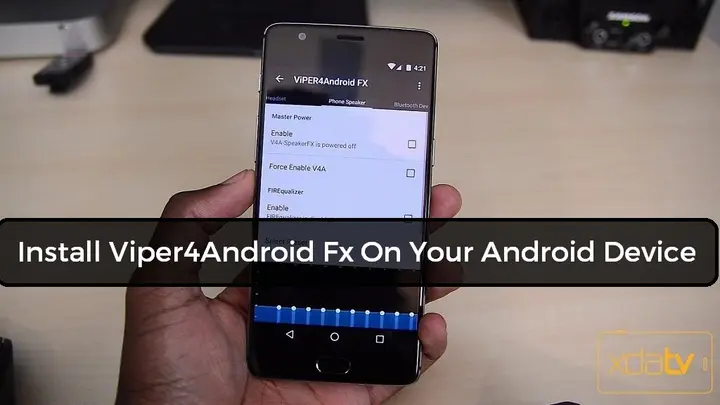
Do you love music, but your phone's sound feels flat?
Back in 2016, ViPER4Android was the answer for a lot of us. When I tested it on my Nexus 5, it ran absolutely fine, and I liked the sound even more than Dolby Atmos.
But a lot has changed since then. The original app is gone, and the old download links are dead.
The version that's left hasn't had a new release since December 2023.
Short answer: ViPER4Android still needs root, and on Samsung and Pixel phones the built-in sound settings are the better place to start. In this guide, I'll show you what's still official, how to install it, and what to try first so you might not need it at all.
Also Read: How to Get Dolby Atmos on Your Android Phone
TL;DR
- It still needs root: ViPER4Android-RE is the version that's left, and it needs a rooted phone with Magisk.
- No new release since December 2023: The last release is v0.6.2, from December 11, 2023, and there's no newer official build.
- Try the built-in settings first: Samsung's "Sound quality and effects" and Pixel's "Spatial audio" and "Adaptive Sound" need no root.
- Only use the official files: Download from the project's official GitHub releases page, and back up your phone before you start.
ViPER4Android vs Built-In Sound Settings at a Glance
| Option | Root needed | Where to find it | Best for |
|---|---|---|---|
| Samsung sound quality and effects | No | "Settings" → "Sounds and vibration" → "Sound quality and effects" | Galaxy phones: Dolby Atmos, equalizer, UHQ upscaler and Adapt sound |
| Pixel spatial audio and Adaptive Sound | No | "Settings" → "Sound & vibration" | Pixel phones: Spatial audio (Pixel 6 and later) and Adaptive Sound (built-in speakers only) |
| ViPER4Android-RE | Yes, with Magisk | Magisk module and app from the GitHub releases page | A detailed equalizer, bass boost and surround effects, if you accept the risks |
If you have a Galaxy or a Pixel, start with the built-in options. Only root your phone if they don't do enough for you.
What Is ViPER4Android?
ViPER4Android is a sound mod for rooted Android phones.
It adds its own audio effects to everything your phone plays: a detailed equalizer, bass boost, surround effects, a limiter and much more.
It was created by ViPER520 and ZhuHang, and they deserve a special thanks for it.

Is ViPER4Android Still Maintained?
Not really.
The original ViPER4Android FX stopped long ago. What's left today is ViPER4Android-RE, a "reverse engineered" rebuild from a team called AndroidAudioMods on GitHub.
Its readme credits ViPER520 and ZhuHang for the original app. Here's where it stands:
- The last release is v0.6.2, from December 11, 2023. Its only change was a fix for a crash on Android 14.
- No new release since then. The project's issue tracker still gets new reports, like "driver not found" on a Pixel 6 with Android 16, but there's no newer official build to fix them.
- The app itself isn't open source. The team says the app's source code "is currently not open source". The audio engine part is public as a separate project.
You'll also find unofficial forks and repackaged versions out there.
They're not from this team, so I'm not linking them. Only use them if you know the person behind them and can check what you're installing.
Try the Built-In Sound Settings First
Check these before you root your phone just for sound. Most phones now have good sound settings built in.
Samsung Galaxy Phones
Go to "Settings" → "Sounds and vibration" → "Sound quality and effects".
There you'll find:
- Dolby Atmos for a wider, surround-style sound.
- Equalizer with genre presets that you can adjust.
- UHQ upscaler, which Samsung says improves sound resolution with wired earphones.
- Adapt sound, which tunes the sound to your hearing after a short hearing test.
Google Pixel Phones
- Spatial Audio: go to "Settings" → "Sound & vibration" → "Spatial audio". Google lists it for the Pixel 6 and later.
- Adaptive Sound: go to "Settings" → "Sound & vibration" → "Adaptive Sound". It adjusts the phone's speakers to the room you're in, and only works on the built-in speakers.
Other Phones
Open "Settings" and search for "Sound effects", "Equalizer" or "Dolby".
Many music and streaming apps also have their own equalizer in their settings, so check there too.
Before You Install ViPER4Android: The Risks
If the built-in options aren't enough for you, that's fine. Just know what you're getting into.
- You need root. Rooting means unlocking your bootloader, which wipes your phone. Back up first.
- Some apps may stop working. Many banking and payment apps check your phone with Google's Play Integrity, and a rooted phone often fails the stricter checks.
- It may not work on your Android version. The last release fixed Android 14. Users report problems on newer versions, and there's no official fix.
- A bad module can stop your phone from booting. Magisk has a Safe Mode for this, which I explain below.
- Fake downloads are everywhere. Only download from the project's official GitHub releases page.
Also Read: What to Do After Rooting Android: 10 Useful Things
How to Install ViPER4Android on Your Android Device
In 2016, I gave you two MediaFire links, BusyBox and an "update drivers" button. That's no longer the process.
The official release notes now ask for just two files: the app and a Magisk module.
Requirements
- A rooted phone with Magisk. If you're not rooted yet, follow my Magisk guide.
- V4A_Magisk_Module_0.6.1.zip from the v0.6.1 release. The v0.6.2 notes say to keep using this module.
- V4A_App_0.6.2.apk from the v0.6.2 release.
- A backup of your phone.
Steps
- Download both files from the GitHub links above.
- Open the Magisk app, go to the "Modules" tab and tap "Install from storage".
- Pick V4A_Magisk_Module_0.6.1.zip and wait for it to finish.
- Install V4A_App_0.6.2.apk. If Android blocks it, allow your browser or file manager to "Install unknown apps" when it asks.
- Reboot your phone.
- Open ViPER4Android and check "Driver status" in the app to see if the driver loaded.
If the driver shows as loaded, play some music and start with small changes. Big bass and loudness boosts can distort the sound and are hard on small speakers.
What to Do if It Doesn't Work or Your Phone Won't Boot
"Driver not found"
This is the most common problem on newer Android versions.
Reboot once more. If it still doesn't load, your phone's Android version probably isn't supported, so remove it and stick with the built-in settings.
How to Remove ViPER4Android
- In the Magisk app, open "Modules" and remove the ViPER4Android module.
- Uninstall the ViPER4Android app.
- Reboot.
If Your Phone Gets Stuck While Booting
Don't panic.
Magisk's own FAQ says that if your phone fails to boot twice in a row, Magisk starts in Safe Mode on the next boot and turns off all modules.
You can also hold volume down a few seconds before the boot animation appears to trigger it yourself.
Also Read: How to Improve Audio Quality on Android (No Root)
Final Thoughts
ViPER4Android was the king of Android sound mods, and I still remember how good it sounded on my Nexus 5.
But it hasn't had a release since December 2023. If it works on your phone, enjoy it, and if it doesn't, nobody is going to fix it soon.
For most people, the built-in settings on Samsung and Pixel phones are the better choice, with no root and none of the risks above.
Whether the team ships another build is not known, so check the GitHub releases page before you start.
FAQs
Does ViPER4Android Need Root?
Yes. ViPER4Android-RE needs a rooted phone with Magisk, and rooting means unlocking your bootloader, which wipes your phone.
Is ViPER4Android Still Maintained?
Not really. Its last release is v0.6.2 from December 11, 2023, and that release only fixed a crash on Android 14.
Can I Improve Sound Without Rooting My Phone?
Yes. Samsung's "Sound quality and effects" and Pixel's "Spatial audio" and "Adaptive Sound" need no root, and many music apps have their own equalizer.
Why Does ViPER4Android Say "Driver Not Found"?
Reboot once more. If it still doesn't load, your phone's Android version probably isn't supported, so remove the module and app and use the built-in settings.
Still stuck? Tell me through the contact page.

Topics
Comments (8)
Comments are closed. Have a question about this article? Ask through the contact page.



Im installed viper4andriod on my mobile(lollipop)
But not working.. no change in audio
Try dolby atmos I hope it will work fine...
I already rooted my phone....but, game haker application also not supported .....
Android Version?
What is the use of doing this???
You will be able to increase the sound of your device ;)
Install Dolby atmos via custom recovery.. Dat is working fine
Yes