
Torrents have been one of the famous sites around the world. People always download from torrents those are movies, software and many other applications. Nowadays torrent sites are closing slowly slowly such as kat.ph, and torrentz.eu. Those sites were one of the best sites for downloading any kind of content. People most of time download the files of torrents from torrent sites or they download from IDM. This is the reason I am coming with an article in which I am going to tell you about Torrents to IDM.
You may also like: What Is WayBack Machine? How To Use it?
I have published many articles, regarding to download the torrent files from IDM with the help of zbigz and other sites. They are working good. But the thing is that the files get deleted by someone or else the passwords are changed every time. This is reason I am going to tell you about how to create one for your self and from those you can download the torrent files from your device.

You can also download the torrent files from your Android device. There I will be telling you about how to download those files from your PC. The name of the site is heroku and they provide us a site from which you can download the files of torrents and that too at the highest speed.
I tried this trick and tried to make one for my self and it was working absolutely fine without any issues and I have downloaded the files from torrents and it was at the highest speed of 1 MBps.
Create Your Own Cloud Torrent Client (Torrents to IDM)
Heroku is the website which helps you to download the torrent files from the IDM and that is really amazing thing. Just because the websites such as zbigz and all you need to pay them for downloading any files from torrents. People usually don't pay for zbigz and bytebx and it is of no use. :( This is the reason I am coming up with an article to tell you how to create one for your self and that too for free.
You can easily download the torrent files from IDM and at unlimited speed. If your torrent client is giving you less speed because of leechers so you should give a try to this one. But there are some rules which you need to follow if you want to download the files. Just because people download wrong things from it.
You may also like: What is Surface, Deep, and Dark Web Internet?
Remember torrents won't land you to jail. According to the Times of India. As recently peoples are afraid of visiting torrent sites and other sites. Lets check out about Create Your Own Cloud Torrent Client.
Features
- Cross platform and it works in every device.
- Embedded torrent search
- Real-time updates.
- Mobile-friendly websites so that you can download from Android.
How to Create Your Own Cloud Torrent Client
- Firstly you need to go to the Github site from here and deploy the application of heroku: GitHub Heroku Deploy
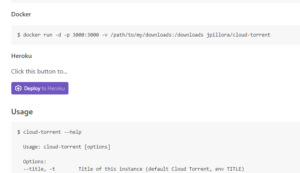
- Scroll down and you will see an option of Deploy Heroku button
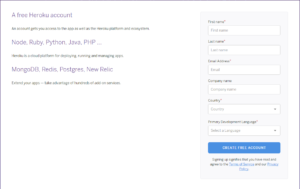
- Now, sign up with the heroku website and enter all your proper details.
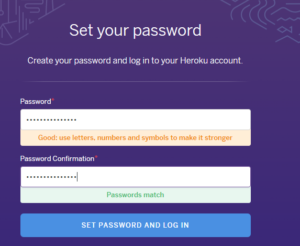
- You will get an email regarding the confirmation. Confirm your email and then it will ask you to enter your password.
- Now, enter the application name in the lower case and then select run time selection. Set as united states only.
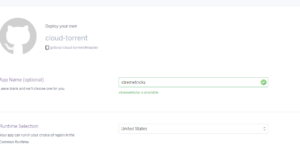
- Below you will find an option for title. Enter your name or your website name. Just because it will be your domain name.
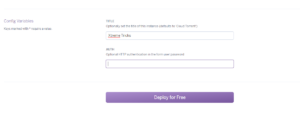
- Now, click on deploy for free and then the site will be start to deploy the application. It will take sometime. You need to wait and then you can view your site by clicking on view.
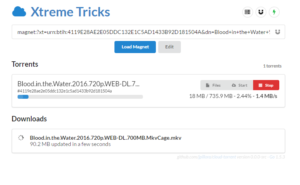
- If you don't want to create one for your self then you can easily try this one and download the torrents files from IDM.
Torrent Leecher 1
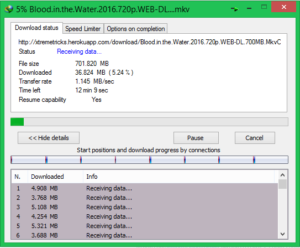
How to Download the Torrent Files From IDM
- You need to visit any torrent website such as I am visiting 1337x.to
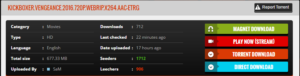
- Right click on magnet download and copy link address and paste the address in the URL box of your herokuru site. Then click on load magnet and the torrent will start getting cached.
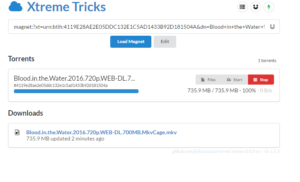
- You can also try my website and content from here: Xtreme Tricks HeroKuru
- When the process will be completed just check the below downloads folder and you will see an option of downloading your file.
- Now, you will be able to download your files easily from it. That too in the blazing fast internet speed without any speed limit.
Rules:
- Don't delete other people's files.
- Don't stop caching process of other peoples.
- Don't download irrelevant contents.
Video Tutorial:
Wrapping up
This way you can download the torrents to IDM. I hope you love this article.
You can share this article with your friends. Share with us your herokuruapp in the comment section below.
Thank you for visiting and keep visiting for more tips and tricks like this and I will meet you in the next one.

Topics
Comments (77)
Show 48 more comments
Thanks bro working.
I have also put on my websiteAuthor 对此,我真的非常感激。我希望你喜欢这篇文章。
is Heroku blocked cloud-torrent?
Any app created by Heroku is not working..............
Bro site is down!!!
Author Which site?
Cloud torrent!! The second one!!
Author Please try the other one. Just try prefix server ;)
Bro peerflix speed is slow!! Can u plzz make another one!! Try lunik torrent..
https://elements.heroku.com/buttons/lunik/lunik-torrent
That one!!
https://elements.heroku.com/buttons/lunik/lunik-torrent
what is the invitation code for the above app??
i am deploy with heroku......deploy is completed successfully but when i open the app it says enter the invitation code!!
So i unable to proceed!!
please help mee!!
Author This is for only Linux servers :(
You can ,
visit:
https://github.com/Lunik/Lunik-Torrent/blob/master/README.md
Follow the steps given in it...
"Register - Create an invitation code"
How did you deploy peerflix-server??
Do you have FB Id to connect ?
Still can I create my own cloud Torrenting with help of your video?
please how can i register to Lunik-Torrent to get an invitation code the link redirecte me to a chines apps page witch i don't understand any think even with google translatore so could somone help me please
dont know but when ever i am deploying peerfix sv its getting suspended ps r u using a paid heroku tier or free one ?
can you please explain me whats going wrong with my process. Even after doing all the steps as u said I am unable to make the app on heroku. Even if it is deployed, after opening the page for first time the next time I open it says no app found. Please help me.
cloud-torrent deploy to heroku doesn't work now. Could you give a tutorial to install Peerflix-server to heroku? that will be great.
Your both links are dead bro
still waiting for torrent leeching service. when it will be available.
Not working bro
No such app - There's nothing here, yet.
This facility of deploying torrent script on heruku server has been withdrawn.
Is MPAA after peerflix hence the herokuapp link not working?
Hey bro its not working more after the deploy is completed app is opening nicely and after a some seconds its showing Disconnected and finally No Such App On Heroku what does it mean ??
Does heroku still supports this?
Coz it removed this applicationCant create a link can u give me urs plz...
use codeanywhere.com
and deploy jpillora cloud node torrent using mega username & passdeploy to heroku is gone
Hlo i was created my site but after i closed the browser and usig that link it ill shows no content i your site plz replay...
Comments are closed. Have a question about this article? Ask through the contact page.




Amazing post bro !!
Thank you
Are you Anonymous with this program can you still get caught with copyright notice?
I didn't get you :(
I was successful at creating it but every time I try to download something it disconnects me and the app is gone?
You are trying from mobile?
No from PC it says my account was suspended
They are closing many accounts. I don't know why
You might have downloaded something wrong :(
after tow days it shows---> Heroku | No such app
There is no app configured at that hostname.
Perhaps the app owner has renamed it, or you mistyped the URL.
Try installing Heroku app again :)
Hopefully this will get fixed.
It will get fixed soon :)
It will get fixed soon :)
In this link "https://github.com/jpillora/cloud-torrent ", it is shown that 'Heroku is no longer supported' :(
The support is been ended now :(
https://github.com/Vigneshsam/cloud-torrent use this
Thank you brother
apps are working for few minutes then its says no such app..
I will surely check the post
it's not working,it showing
"Heroku | No such app
There is no app configured at that hostname.
Perhaps the app owner has renamed it, or you mistyped the URL."
Download speed is slow but caching speed is awesome.
No such app found
Speed is not good
Depends on internet
Hyy bro thnx for this amazing stuff.. but i have problems when i download something 25-50gb file automatically deleted plzz help
There might be limit of your downloading or else someone is deleting your files :(
I thought time limit bro become no one's use my cloud torrent????
Plz give a tutorial how to upload files to direct Google drive or any cloud storage.
You can use websites such as rabb.it