Android is the best operating system when it comes to customization, changes and everything. There are a lot of changes you can make to your Android device.
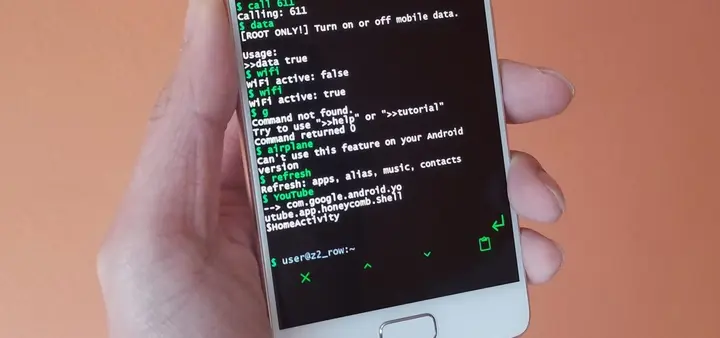
We know that the Android kernel is Linux. We like the green font we use in Linux or sometimes in the command prompt. Today, I am going to show you a Linux-style launcher that turns your home screen into a command prompt.
Also Read: How to Install Google Assistant On Your Windows, Linux, and Mac PC
There are many fantastic Android launchers that are useful for customization. Today, I am going to show you something different. In this article, I will show you how to make your Android look and feel like Linux. Excited?
You can completely change the way you use your phone. Whenever you need to make a call or uninstall an Android application, you can do it with commands. A command can uninstall an application or call your loved ones.
This is a simple Linux-type application, and it has an excellent rating on the Play Store. You can try it on your device.
Also Read: How to Dual Boot Multiple ROMs on Your Android Phone

Linux CLI Launcher
Linux CLI Launcher by Francesco Andreozzi is an amazing launcher. When you use it, you can brag in front of your friends by showing that you operate your Android device with commands.
The application has a tutorial with its commands. If you read it, you will understand how to install and use this launcher on your Android device.
This Linux-Style Launcher Turns Your Home Screen into a Command Prompt
There are commands in the application that you need to follow. This launcher has no home screen, just a simple command prompt. You need to write a command to open the calculator, YouTube or Google, or to call your friends.
Also Read: Download Pure Windows 7 Launcher For Your Android (Latest Version)
When you write a command, you will get auto-complete text. For example, when you write open c, it will automatically suggest the names of applications that start with c.
There are a lot of reviews, and the developer has built the application perfectly. It works on almost every Android device. You can install this launcher and get started.
How to Turn Your Home Screen into a Command Prompt
- Download and install the CLI Launcher from the Play Store.

- Open the application, and it will show you a guide on how to use it on your device.
- Read all the details carefully. After that, you can type commands and do all kinds of things you like.
- You can type the help command if you don't understand a command.
- Tap the home button to set the launcher as the default launcher. Then you won't get an annoying pop-up every time you press the home button.

- If you want to call someone, type the command "call mom". Use your own contact name here.

- If you want to uninstall an application, type the command "uninstall WhatsApp."

- This way, you can enjoy the Linux user interface on your Android device.
Final Verdict:
I hope you love this fantastic application and can now turn your home screen into a command prompt. Try installing it, and believe me, it is fun.
Start bragging in front of your friends. Show them how you gave your Android phone a Linux user interface.
If you want to uninstall the application, open the Play Store, search for this application and uninstall it. Share this article with your friends.
Also Read: Download and Install Android O Pixel Launcher on any Android Device
If you get stuck, tell me through the contact page.
Source: GadgetsHacks

Topics
Comments (2)
Comments are closed. Have a question about this article? Ask through the contact page.



Linux launcher is so nice and cool. Through you i come across very smart ideas and information
I appreciate you like it :)