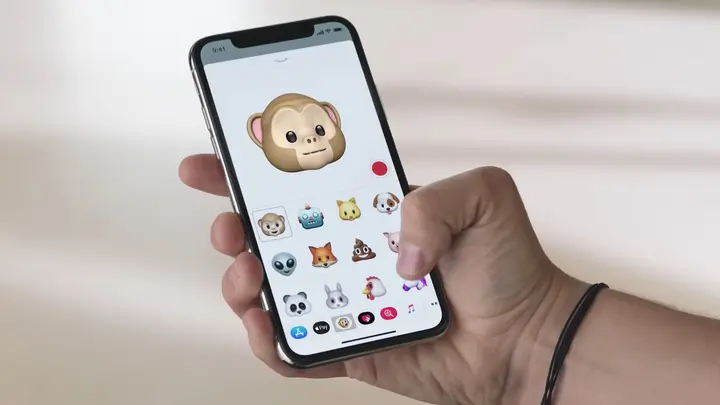
The iPhone X is now available for all users, and you might have seen a lot of memes. The most exciting feature is Animoji. Who doesn't want it on their phone?
This feature is available only for iPhone X users. But today, I'm going to show you how you can use these Animojis on your Android phone too.
Also Read: How to Get The iPhone X Swipe-to-Go-Home Gesture on Any Android
Now, if you have an iPhone, you can't enjoy this feature on your phone. There is no app on the App Store that will help you enjoy this feature. But if you have an Android phone with the Play Store installed, you can enjoy it on your Android phone.
If you have an Android phone, one of the most important things you need is the front camera, so that you can get this feature on your phone.
I won't be telling you about an app made by Google or something like that. I will be showing you a nifty trick that will help you bring back those Animojis on any Android phone.
Also Read: Meet the Man Who Added a Headphone Jack to the iPhone 7

Get iPhone X Animojis on Any Android Device
Now, you might be thinking, "I can enjoy the new iPhone X Animoji on my phone without even buying a $1000 iPhone X."
Well! That's not quite right. The iPhone has the hardware and software that make Animoji work perfectly. If you use an Android app, it will not be that good.
In short, you need to control your expectations if you want to enjoy this Animoji feature on your Android. To enjoy it, you need to make sure that your camera is good and can detect the location of your head.
Also Read: Install iOS 11's App Open/Close Animations on Your Android Device
This app is freely available on the Play Store if you want to try Animoji on your phone. You will find too many Animojis to enjoy on your phone.
I know this app is not that perfect, but I will tell you one thing: it will bring a smile to your face.
How to Get iPhone X Animojis on Any Android Device
- Download the Animoji app for your Android phone from Download App

- Install the app and open it on your phone.
- Now, open the app, and you will see a camera. Just switch the filter.
- When you switch the filter, you will see two types of filters: Pig and Smiley face. You can choose the one you like.

- That's it! You can enjoy the new Animoji on your Android phone.
Final Verdict:
That's it from my side. You can get iPhone X Animojis on any Android device, no matter what kind of phone you are using.
Also Read: How to Dual Boot Multiple ROMs on Your Android Phone
Share this article with your friends and let them know about this fantastic app that will help them create Animojis on their phone.
Don't forget to subscribe to the newsletter for daily updates.

Topics
Comments (1)
Comments are closed. Have a question about this article? Ask through the contact page.



Thanks for such an amazing trick.