Apple's iOS 11 is soon going to launch with amazing features. This time, iOS 11 has a bunch of great animations that you can enjoy on the iPhone. There is a cool animation for opening and closing apps, and much more.
Today, I'm going to show you how to install the iOS 11 animation on any Android device.
Also Read: How to Install TOR On Android and iOS Smartphones
XDA member mizdrake7 developed a zip file that lets users enjoy the iOS 11 app open/close animations on their Android device.
It is a universal zip file that you can flash on your device. It also takes a backup of the current files on your device.
If you want to enjoy this mod, you can easily download the zip file and flash it with the help of TWRP recovery. The zip file quickly modifies your framework-res.apk file, and you can enjoy the iOS 11 feature on your device.

Install iOS 11's App Open/Close Animations on Your Android Device
Most of the time, Samsung, Xiaomi, Apple and other phone makers work hard on animations, and they grab the attention of users.
Also Read: How to Enable Double Tap to Sleep On Any Android Device [No Root]
If you want to enjoy the iOS 11 animation on your device, flash the file using TWRP recovery, and then you can enjoy the animation.
Animations consume your phone's battery. This file automatically takes a backup of your stock animation, which you can restore anytime.
Also Read: How to Backup and Restore Via ADB Over Wi-Fi using FlashFire
Requirements:
- TWRP Recovery: Install TWRP Recovery
- Universal iOS 11 Animation: Download
How to Install iOS 11's App Open/Close Animations on Your Android Device
- Download the above file and save it to your internal storage.
- Turn off your device.
- Boot your phone into recovery by pressing "Volume Down + Power Button."
- Click on the Install button.
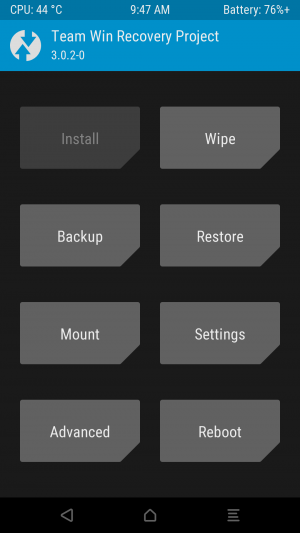
- Search for the file and tap on it.

- Swipe the slider to the right to install it on your device.

- Reboot your device and wait for some time.

- Now, open any app on your device, and you will see the animation.
Also Read: How to Change Pixel Density On Any Android Device [No Root]
Final Verdict:
Now you know how to install iOS 11's app open/close animations on your Android device. I hope you love this amazing, cool animation.
Share this article with your friends, and brag in front of them about how you installed the iOS 11 animations on your device.
If you get stuck, tell me through the contact page.

Topics
Comments (2)
Comments are closed. Have a question about this article? Ask through the contact page.


I am enjoying this animation but i wants to know that how to remove this animation?
When you flashed the file, you will see that in your internal storage there would be a folder called as vrtheme_backup. You will find the backup and simply flash the file and done :)