TechVerge
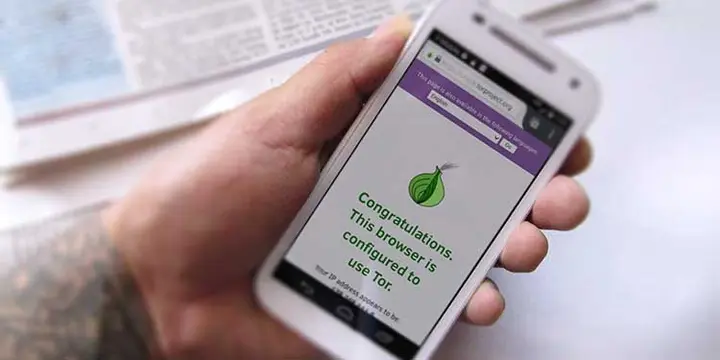
Want more privacy when you browse on your phone?
Tor is a good place to start.
In my article on the Surface, Deep and Dark Web, I showed how to use Tor on Windows, Linux and Mac. This guide covers your phone.
In short: on Android, install the official Tor Browser from the Play Store. On iPhone, there is no Tor Browser, so use Onion Browser instead.
When I first wrote this in 2017, I showed you Orbot on Android and an app called VPN Browser on iPhone. A lot has changed since then.
The Tor Project now has its own official Tor Browser for Android.
Orbot works without root. The iPhone app I suggested has turned into something else, and I'll explain that below.
Also Read: How to Unblock Blocked Websites on Android (3 Safe Ways)
TL;DR
- Android: install Tor Browser from the Play Store, made by The Tor Project. For other apps, add Orbot.
- iPhone: there is no Tor Browser. Use Onion Browser by Mike Tigas. Orbot is also on the App Store as a Tor-powered VPN for the whole phone.
- Avoid: fake "Tor" and "Onion" apps. The old VPN Browser is now a subscription VPN app from a different company.
- Keep in mind: don't use a separate VPN with Tor, and expect it to be slower than a normal connection.
Tor on Android and iPhone at a Glance
| Option | Works on | Best for | Where to get it |
|---|---|---|---|
| Tor Browser | Android | Browsing privately inside Tor Browser | Play Store, F-Droid, torproject.org |
| Orbot | Android | Sending other apps through Tor | Play Store |
| Onion Browser | iPhone | Browsing privately on iPhone | App Store |
| Orbot | iPhone | Sending the whole phone through Tor | App Store |
What Is Tor?
Whenever you visit a website, it can see your IP address. That tells it roughly where you are.
Suppose you are in India and visit a website in the USA. With a proxy server, the website might think you're visiting from Dubai instead of India.
Tor goes a lot further than a simple proxy. It sends your traffic through three volunteer-run servers around the world, called relays, and encrypts it three times along the way.
Someone watching your connection can only see that you're using Tor, not which sites you visit. That's why journalists, activists and people in countries that block websites use it every day.
Is Tor Legal?
Tor is a privacy tool, made by a nonprofit called the Tor Project.
Some countries block or restrict it, so check the rules where you live. What you do over Tor still has to be legal.
My advice from 2017 still stands: stay away from shady dark web sites.
How to Install Tor Browser on Android
Tor Browser for Android is the only official mobile browser from the Tor Project. It's free and open source.
Requirements
- An Android phone running Android 8.0 or newer
- An internet connection (mobile data or Wi-Fi)
- Install Tor Browser from the Google Play Store. Check that the developer is The Tor Project.
- Open it. If you want it to connect by itself every time, turn on "Always connect automatically".
- Tap "Connect".
- If it can't connect because Tor is blocked on your network, tap "Try a bridge". Bridges help you get around blocks.
That's all it takes. You can now browse privately.
Not using the Play Store? You have two other official options:
- F-Droid: The Guardian Project offers Tor Browser in its official F-Droid repository.
- The Tor Project website: Download it from torproject.org. The Tor Project says that if you're not sure which type of processor your phone has, you should install it from an app store instead.
Set the Security Level
Tor Browser has three security levels: Standard, Safer and Safest.
- Tap the three-dot menu.
- Under "Privacy and security", tap "Security Level".
- Pick a level and tap "Save and restart".
Safest turns off JavaScript on every site. Some websites will break, but it's the most private option.
How to Use Orbot on Android (for Other Apps)
Tor Browser only protects what you do inside Tor Browser.
If you want other apps to go through Tor too, use Orbot. It's a free app made by the Guardian Project.
- Install Orbot from the Play Store.
- Open it and connect.
- Android will ask for permission to set up a VPN connection. Allow it.
Orbot works as a VPN, so any app can be routed over Tor.
In 2017, Orbot sometimes needed Super User (root) access for this. Not anymore.
For browsing, still use Tor Browser. It's built to block trackers and make everyone look the same to websites, which a normal browser over Orbot can't do.
What About Tor VPN?
The Tor Project is also testing its own app called Tor VPN for Android.
It's still in beta, and the Tor Project itself says it may leak information and shouldn't be used for anything sensitive. So I'd stick with Orbot for now.
How to Install Tor on iPhone
There is no Tor Browser for iPhone. The Tor Project recommends an app called Onion Browser instead.
- Install Onion Browser from the App Store. Check that the developer is Mike Tigas.
- Open it and follow the steps to connect to Tor.
- If it doesn't connect, try using bridges, then force-quit the app and open it again.
Onion Browser is free and open source. It has optional in-app tips if you want to support the developer.
The limitation worth flagging: Onion Browser can't protect you as well as Tor Browser does on Android or a computer. The Tor Project says that's because Apple forces every iPhone browser to use its own WebKit engine.
If you want your whole iPhone to go through Tor, Orbot is on the App Store too, as a Tor-powered VPN.
Watch Out for Fake "Onion" Apps
This one is important.
The iPhone app I suggested in 2017, VPN Browser, is now called "Onion Browser : Private VPN".
It's made by a different company, Falling Rain Software, and it's a subscription VPN app. It is not the Onion Browser that the Tor Project recommends.
The App Store has many apps with "Tor" and "Onion" in their names. Always check the developer before you install.
Also Read: How to Create Your Own VPN: The Definitive Guide
Tor Safety Tips
Tor gives you a lot of privacy, but only if you use it the right way. These tips come straight from the Tor Project:
- Don't use a separate VPN with Tor.
- Don't install extra add-ons in Tor Browser.
- Don't torrent over Tor. The Tor Project says it's never safe.
- Don't open documents you downloaded through Tor while you're online. They can reveal your real IP address.
- Remember that logging in reveals you. If you sign in to a website, it still doesn't know your location, but it knows who you are.
And be patient. Tor is slower than a normal connection, because your traffic takes a longer route around the world.
Final Thoughts
On Android, install the official Tor Browser, and add Orbot if you want other apps to use Tor too. On iPhone, use Onion Browser from Mike Tigas.
Check the developer name every time you install, because fake "Tor" and "Onion" apps are common on the App Store.
In 2017, I wrote that this would make you completely anonymous. Let me correct that.
No app makes you 100% anonymous. Tor makes it much harder to track you, as long as you follow the safety tips above.
FAQs
How do I install Tor on Android?
Install the official Tor Browser from the Google Play Store, check that the developer is The Tor Project, then tap "Connect". You can also get it from F-Droid or torproject.org.
Is there a Tor Browser for iPhone?
No. The Tor Project recommends Onion Browser by Mike Tigas instead, which you can get from the App Store.
How do I send other Android apps through Tor?
Install Orbot from the Play Store, open it, connect, and allow the VPN permission that Android asks for. Orbot works without root.
Is VPN Browser the Onion Browser from the Tor Project?
No. VPN Browser is now called "Onion Browser : Private VPN" and is made by Falling Rain Software.
It's a subscription VPN app, not the Onion Browser that the Tor Project recommends.
Does Tor make me 100% anonymous?
No. Tor makes it much harder to track you, but no app makes you 100% anonymous.
Logging in to a website still tells it who you are.
Still stuck? Tell me through the contact page.