TechVerge
Searching for how to get the MacBook Pro Touch Bar on your Android device? You just landed in the right place. Let me first tell you what a Touch Bar actually is.
Apple Inc. is known for coming up with new and innovative ideas in its devices. It proved that again by launching the Touch Bar on the MacBook Pro in October 2016.
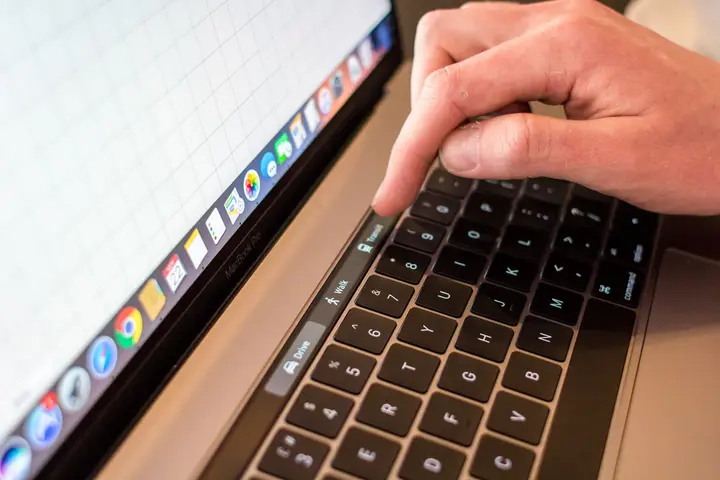
The Touch Bar is a touch shortcut strip placed right above the top row of keys on the MacBook’s keyboard, as you can see in the image below.
Also Read: How to Install Google Assistant On Your Windows, Linux, and Mac PC
But what does the Touch Bar do?
The Touch Bar simply puts shortcuts for the things you often use right at your fingertips. For example, quick settings or your favourite smileys (on the MacBook only).
This idea inspired iOS developers to build a Touch Bar for iOS devices, which lets users use a hovering Touch Bar on their devices. But that was only for jailbroken iOS devices.
Right after that, an Android developer built a TouchBar app, which is very similar to the iOS version. It is free for Android users, and most importantly, it doesn’t require a rooted Android device.
Now let me tell you, step by step, how you can easily get the MacBook Pro Touch Bar on your Android device.

Features of TouchBar
TouchBar displays shortcuts for the settings you use many times a day, like WiFi, Bluetooth, Screen Rotation, Screen Brightness, Media Volume and Alarm Volume. Besides these, it shows a Quick Google Search button and a Music Player.
So you no longer have to scroll down your quick settings bar to change those settings. They are just one tap away.
Also Read: How To Turn Your Android Phone Just Like Mac OS
How to Get a MacBook Pro-Like Touch Bar on Your Android Device [No Root]
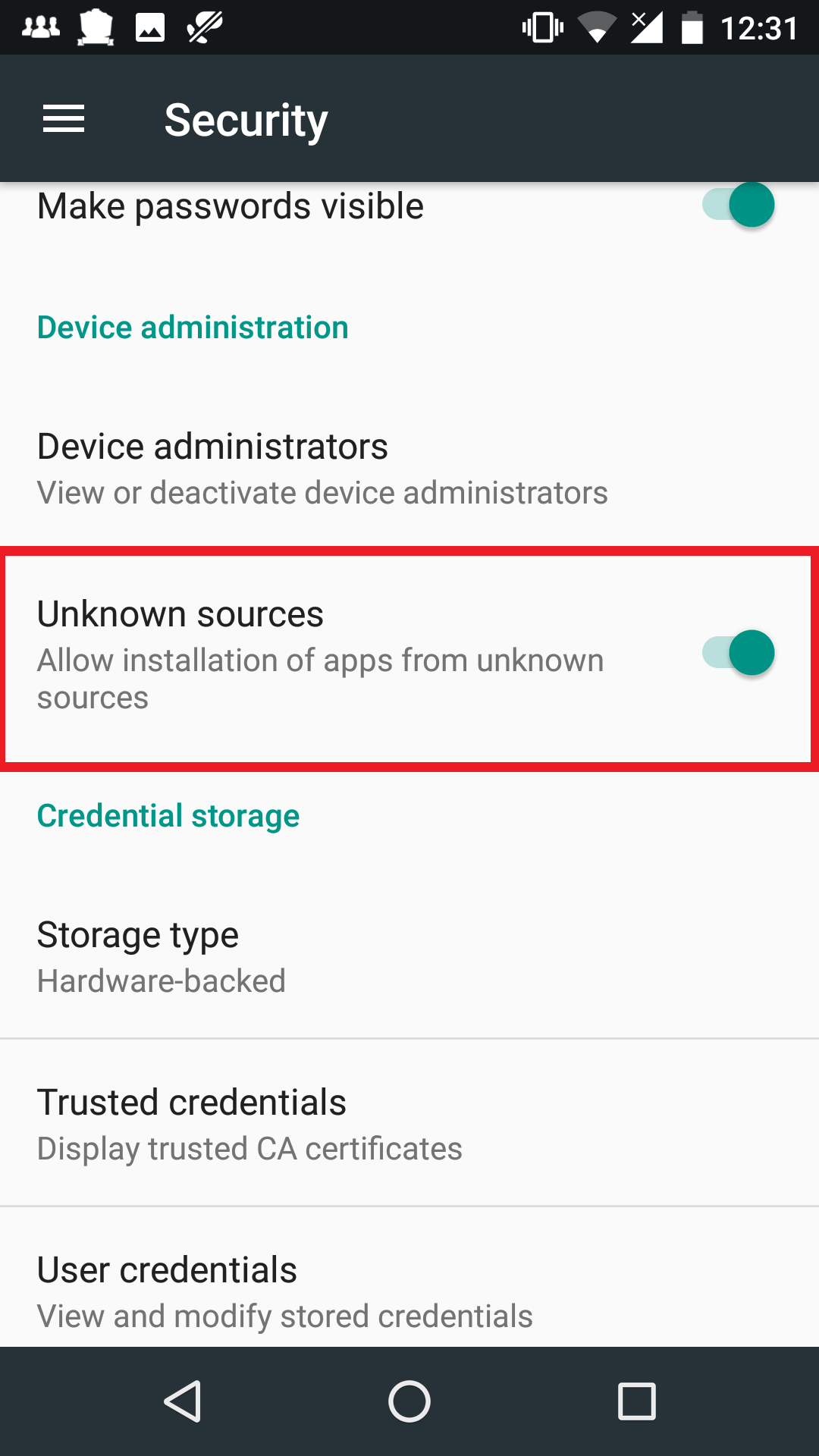
Step 1: Before the installation, you should know that the TouchBar app for Android is not available on the Play Store. So, to install it, you have to allow the installation of third-party apps.
For that, go to the Security section in your device’s Settings and enable "Unknown Sources". (Don't worry, you can disable it once the app is installed.)
Step 2: Done with enabling Unknown Sources? Now it's time to download the “TouchBar” app for Android from here and install it like any other app.
Step 3: Once the installation is finished, open the app and you will see a "Special Access" section. There, you have to grant the app permission for "Overlay Screen", "Write System Settings" and "Do Not Disturb Access". So just tick all three blocks one by one.
Step 4: You can activate TouchBar by scrolling down to the "TouchBar Settings" section and tapping on "Activate TouchBar".

Then tap on "Add Shortcut" to add a shortcut icon to your home screen, so you can enable TouchBar by just touching that icon.
The Touch Bar hides after 1 second of use, because it is set to auto-hide after 1 second by default. You can change the number of seconds to auto-hide in the "TouchBar Settings" section.
Also Read: How to Enable Double Tap to Sleep On Any Android Device [No Root]

Step 5: You can access the Touch Bar by tapping on the bottom of your device screen or by tapping the Start/Stop shortcut.
Final Verdict:
That was the article about a MacBook Pro-like Touch Bar on Android. I hope you love it.
Share this article with your friends, and let them know about this amazing app that helps users enjoy shortcuts on Android.
Also Read: How to Enable Android O Boot Animation on Any Android Device
If you get stuck, tell me through the contact page.