Facebook is the second-ranked website in the world. Many times when we use Facebook, we come across videos that we love.
We want to download some of them and keep those moments. So in today's trick, I'm going to show you how to download Facebook videos without installing any third-party application or software.
This is the easiest way to download a Facebook video without ruining its quality.
Also Read: How To Solve Video Not Available In Your Country Error On YouTube
A Simple Way to Download the Video Without Any Third-Party Application
- Log in or sign up with Facebook (I know many of you already have an account).
- Now search for the video you want to download.
- Right-click on the video and you will see three options: Pause, Mute, and Show Video URL. Click on Video URL.
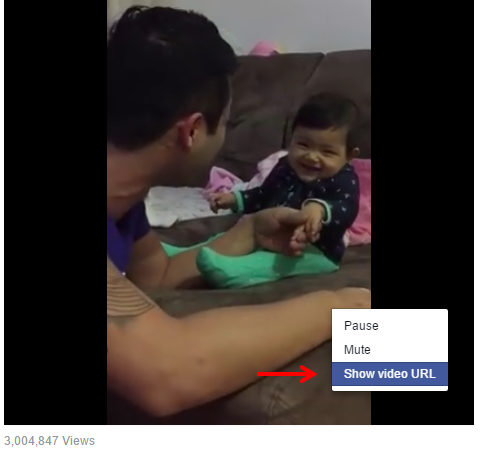
- Now copy the URL of the video, like in the screenshot below.
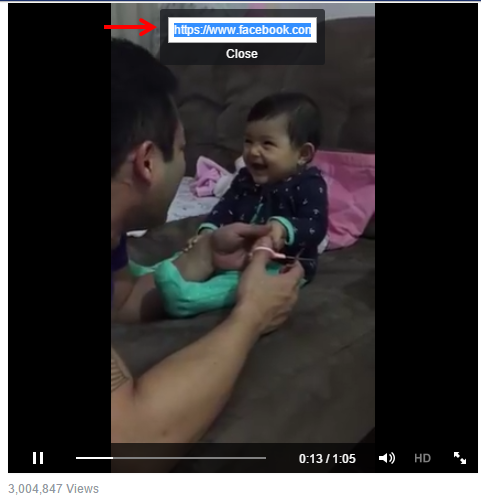
- Open another tab, paste the URL, and replace www with m. Check the screenshot below for a better understanding.
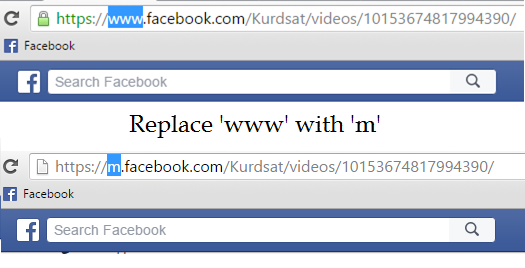
So this was the easiest and best method to download any video from Facebook.
Also Read: How to Get Facebook Flat Design on Google Chrome
You will find many methods on Google that suggest third-party websites and applications. Try this method instead.
Also Read: How to Use Two Facebook Accounts on One Android Phone (2026)
If you get stuck, tell me through the contact page.

Topics
Comments (1)
Comments are closed. Have a question about this article? Ask through the contact page.


I had replaced www with "m" but that video opens in the mobile version only.But it doesn't downloading .